
What is IPTV and How Does It Work? (2026 Complete Guide on How to Get Started)
Cord-Cutting & Digital Streaming Blueprint
What is IPTV and how does it work? IPTV, or Internet Protocol Television, is a digital broadcasting technology that delivers live television channels and on-demand video content over standard internet protocol networks rather than traditional satellite, terrestrial, or coaxial cable television formats. Instead of transmitting hundreds of channels simultaneously through physical cables into your living room, an IPTV architecture streams only the specific channel or movie you choose to watch, directly on demand.
Table of Contents: Complete IPTV Blueprint
- 1. IPTV vs Traditional Cable Comparison
- 2. Core IPTV System Architecture Matrix
- 3. How IPTV Works: 3 Content Formats
- 4. What Equipment Do You Need to Get Started?
- 5. Is IPTV Legal in the United States?
- 6. Step-by-Step Setup in Under 2 Minutes
- 7. Buyer Checklist: Choosing a Provider
- 8. Transparent Subscription Plans
- 9. Frequently Asked Questions
- 10. Conclusion & Next Steps
For decades, watching television required signing rigid multi-year contracts, renting clunky set-top boxes, and enduring monthly cable bills exceeding $120. In 2026, cord-cutters across the United States are ditching legacy providers in record numbers. By utilizing internet-based streaming, viewers can now access tens of thousands of live global channels, complete out-of-market sports packages, and massive movie libraries on any screen in their home for a fraction of the cost.
Whether you are asking what is ip tv, wondering how does iptv work, or researching how to get iptv for the very first time, this beginner guide provides a complete blueprint. We break down the underlying technology, review the legal framework in the USA, compare the hardware options, and show you exactly how to get started in under two minutes with XIPTV PRO.
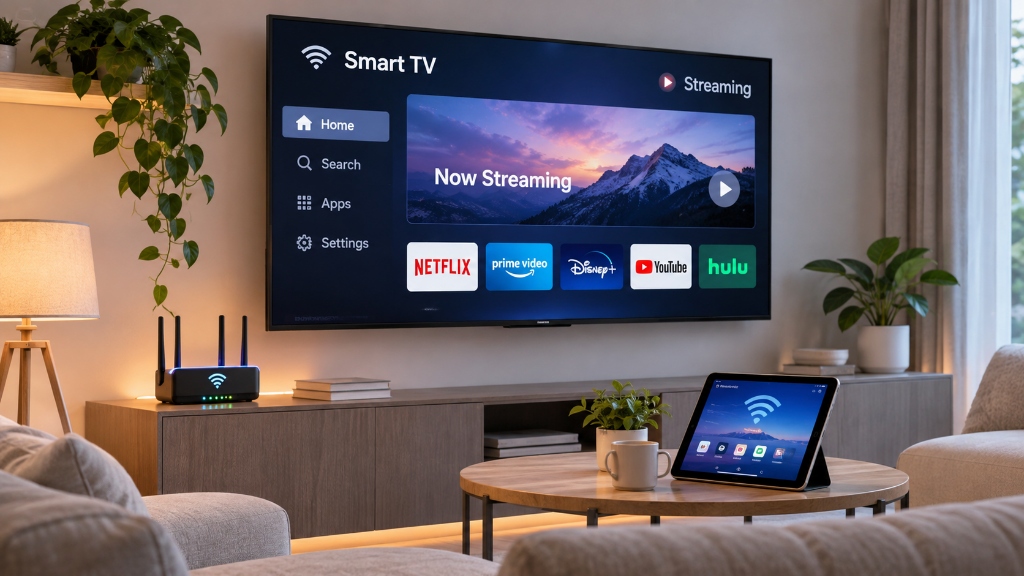
Quick Summary: IPTV vs Traditional Cable at a Glance
If you are evaluating whether making the switch makes financial and technical sense, review this direct comparison between traditional US cable television and modern IPTV:
| Feature / Metric | Traditional US Cable TV | Premium IPTV Service (XIPTV PRO) |
|---|---|---|
| Average Monthly Cost | $95.00 – $150.00 / mo | $5.83 / mo (with 1-Year Pass) |
| Annual Household Cost | $1,140 – $1,800 / year | $69.99 / year |
| Contract Commitments | 1 – 2 year binding contracts | Zero contracts (cancel anytime) |
| Hardware Equipment | Proprietary rented cable box ($15/mo fee) | Use your existing FireStick, Apple TV, or Smart TV |
| Channel Selection | 150 – 250 local & basic channels | 25,000+ live worldwide channels |
| Video on Demand (VOD) | Limited pay-per-view rentals ($5-$20 each) | 130,000+ movies & TV series included free |
| Sports Coverage | Heavy blackouts & expensive add-ons ($350+) | Complete NFL, NBA, UFC, Premier League included |
| Multi-Device Support | Restricted to hardwired rooms | Stream on TVs, phones, tablets, or laptops |
💡 Financial Reality: For a complete mathematical breakdown of household savings, check our in-depth analysis on cable TV vs IPTV cost comparison.
Technical Specifications: The Core IPTV Architecture
Understanding the mechanics of ip tv helps you select the right equipment and troubleshoot playback. Here are the core technical parameters that power modern streaming:
IPTV System Architecture Matrix
HLS (HTTP Live Streaming) / MPEG-TS / RTSP
Unicast (1-to-1 on demand) & Multicast (1-to-many live)
H.265 (HEVC) & H.264 (AVC)
12 – 20 Mbps (4K UHD) | 6 – 9 Mbps (1080p FHD) | 3 – 5 Mbps (720p HD)
25 Mbps stable download for 4K | 15 Mbps for FHD
Xtream Codes API & M3U Plus Playlist format
Live Television, Video on Demand (VOD), Time-Shifted Catch-Up
How Does IPTV Work? The 3 Core Content Formats
Traditional television operates on a broadcast model. Cable companies blast hundreds of channel signals down a copper wire into your home simultaneously. Your television tuner simply filters out every signal except the one you tune to, wasting massive amounts of network capacity.
How does iptv work instead? IPTV relies on a packet-switched network. When you select a channel on your screen, a small digital request travels to a Content Delivery Network (CDN) edge server. The server retrieves that specific video stream, slices it into tiny data packets, and sends it directly to your device. When you change the channel, the old stream stops, and the new stream begins instantly.
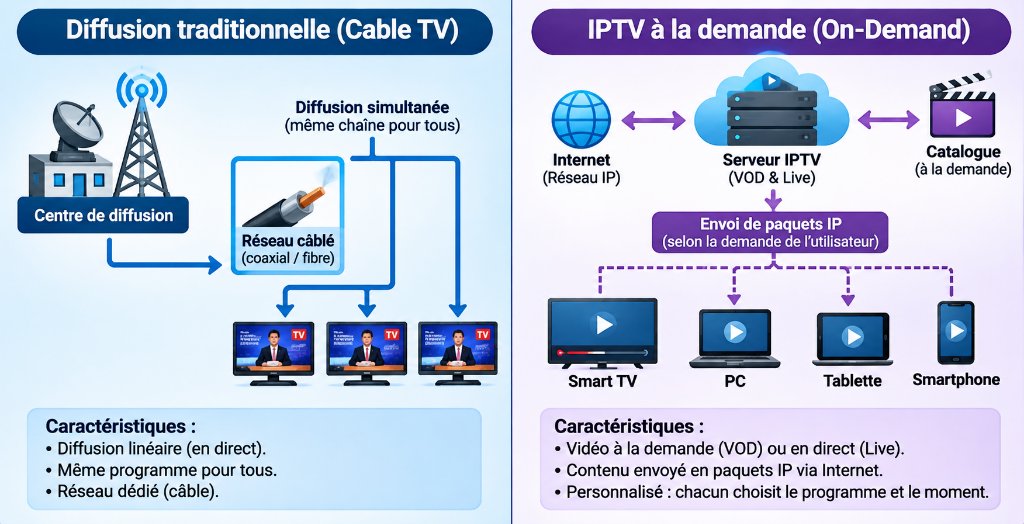
Modern IPTV architectures deliver three distinct content formats:
1. Live Television (Live IPTV)
Live IPTV broadcasts real-time television over the internet with minimal delay. This includes live news, award shows, and major sporting events like the Super Bowl, NBA Finals, and UFC Pay-Per-Views. Dedicated providers like XIPTV PRO maintain redundant 10Gbps server clusters to deliver live streams at native 60 frames per second without buffering.
2. Video on Demand (VOD)
Just like Netflix or Amazon Prime Video, Video on Demand allows subscribers to browse an extensive digital library of blockbuster movies and complete television series. You can play, pause, rewind, and fast-forward at your convenience without commercial interruptions.
3. Time-Shifted TV (Catch-Up & Start-Over TV)
Time-shifted television allows viewers to watch previously broadcast shows. If you missed a live news broadcast or sporting event that aired earlier in the evening, catch-up features let you replay the program within a rolling 24 to 72 hour window.
What Equipment Do You Need to Get IPTV?
One of the greatest advantages of an iptv service is hardware freedom. You do not need a technician drilling holes through your walls or mounting satellite dishes on your roof.
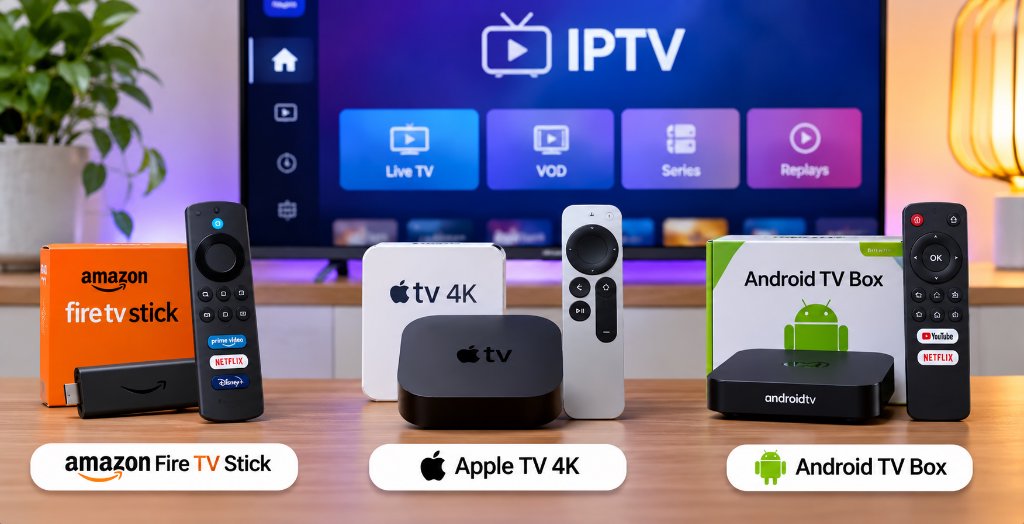
To stream smoothly, you only need three basic items:
1. A Reliable High-Speed Internet Connection
Because IPTV transmits video data packets over the internet, connection stability is vital:
- Standard HD (720p): Minimum 10 Mbps download speed.
- Full HD (1080p @ 60fps): Minimum 15 Mbps download speed.
- 4K Ultra HD (2160p): Minimum 25 to 30 Mbps download speed.
For the best reliability during live sports, connect your streaming device using a 5GHz Wi-Fi band or a direct Ethernet cable.
2. A Compatible Streaming Device or IPTV Box
An iptv box or digital media player connects to your television via HDMI:
- Amazon Fire TV Stick 4K / 4K Max: The most popular, cost-effective streaming device in the USA. Excellent hardware video decoding.
- Apple TV 4K: Top-tier processing speed, clean interface, and smooth playback for high-bitrate feeds.
- Android TV / Google TV Boxes (Nvidia Shield Pro, Chromecast): Outstanding versatility and full support for advanced player apps.
- Smart TVs (Samsung Tizen & LG webOS): Direct app store installation without needing an external streaming stick.
3. A Dedicated IPTV Player App
An IPTV player is the software interface that organizes your channel guide, handles playback, and displays program schedules. The top two player applications in 2026 are:
- TiviMate IPTV Player: The undisputed champion for FireStick and Android TV, offering multi-view split screens and instant zapping. Learn how to configure it in our TiviMate FireStick setup guide.
- IPTV Smarters Pro: The best cross-platform application for iOS, Android, and Smart TVs. Follow our step-by-step walkthrough in the IPTV Smarters Pro setup tutorial.
Is IPTV Legal in the United States?
One of the most common questions new cord-cutters ask is: is iptv legal or is iptv illegal in usa?
The short answer is: IPTV technology itself is 100% legal.
IPTV is simply a technological transmission standard. When major telecommunications providers like AT&T (DirecTV Stream), Comcast (Xstream), or Hulu + Live TV stream channels over the web, they are using IPTV technology.
The legal boundary depends entirely on the provider:
- Licensed Providers: Services that hold formal rebroadcasting agreements with television networks and copyright owners operate within full legal bounds.
- Unlicensed Operators: Platforms that re-stream copyrighted television channels without licensing violate international copyright laws.
As a consumer in the United States, utilizing an IPTV service to watch television is common practice. However, protecting your digital privacy is always smart. Many internet service providers employ automated traffic shaping that throttles high-bandwidth video packets during peak evening hours. To preserve your bandwidth and privacy, pairing your setup with a reliable VPN or custom DNS resolver is recommended. For a detailed legal exploration, read our guide on is IPTV legal in the USA.
How to Get IPTV: Step-by-Step Setup in Under 2 Minutes
If you are wondering how do i get iptv or how do you get iptv configured on your television, follow this simple process:
Step 1: Choose a Verified Subscription Pass
Visit the XIPTV PRO Shop and pick a subscription plan. Options range from a 1-Month trial pass ($11.99) to a 1-Year pass ($69.99).
Step 2: Receive Your Instant Credentials
Within 2 minutes of checkout, check your email for your Xtream Codes API details: Server URL, Username, and Password.
Step 3: Install an IPTV Player on Your Device
On your Amazon FireStick or Smart TV, download and install TiviMate or IPTV Smarters Pro from the app store or Downloader.
Step 4: Log In with Xtream Codes API
Open your player app, select “Add Playlist”, choose “Xtream Codes API”, and enter the Server URL, Username, and Password sent to your email.
Step 5: Start Streaming
Allow 30 seconds for the channel guide (EPG) and VOD catalogs to sync. Enjoy 25,000+ live channels and 130,000+ movies in 4K resolution!
How to Choose the Best IPTV Service: A Buyer Checklist
With hundreds of providers marketing subscriptions online, separating premium services from low-quality resellers is essential. Use this checklist when evaluating any provider:
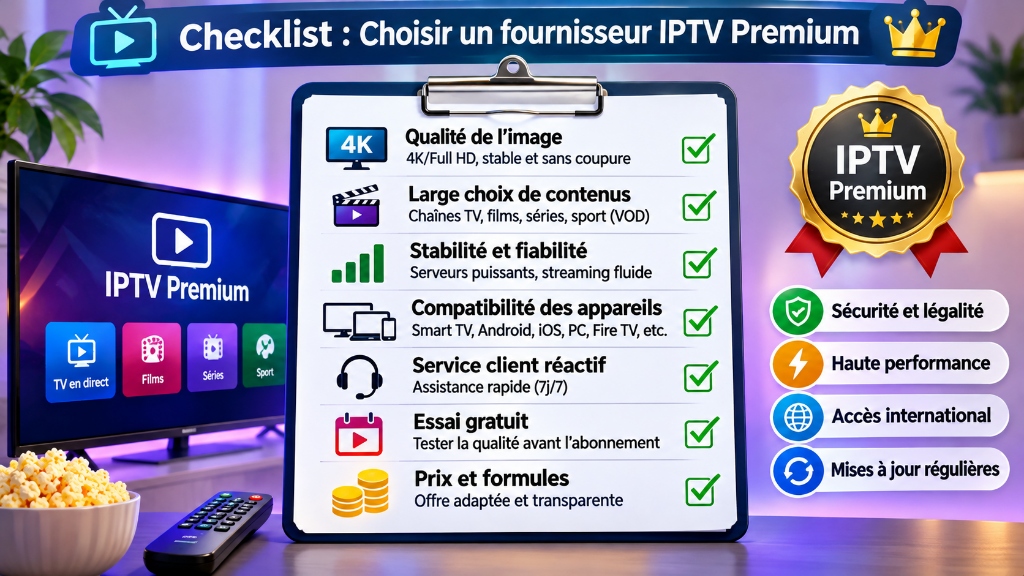
- 1. Native 4K & 60fps Broadcasts: Never settle for 30fps re-encoded streams that blur during fast-moving sports. Ensure your provider offers true 60fps broadcasts.
- 2. Dedicated Anti-Freeze CDN Technology: High-traffic weekend events cause budget servers to collapse. Verify that your provider uses multi-server load balancing.
- 3. Comprehensive EPG Support: A functional Electronic Program Guide is essential so you know what is currently airing and what comes on next.
- 4. Transparent Pricing Without Hidden Contracts: Avoid providers demanding auto-renewing credit card holds. Look for flat-rate passes with money-back guarantees.
- 5. 24/7 Responsive Customer Support: If a connection hiccup occurs on a Saturday night, you need real human assistance via WhatsApp or email, not automated bot responses.
For a comprehensive evaluation of provider reliability and server uptime tests, consult our best IPTV service in USA review.
Transparent Pricing: Finding the Right Pass for Your Needs
Unlike traditional cable packages that bundle hidden regional sports surcharges and broadcast fees, XIPTV PRO offers straightforward pricing with zero equipment rental charges:
| Subscription Plan | Total Price | Effective Monthly Cost | Best Suited For | Direct Access |
|---|---|---|---|---|
| 1-Month USA IPTV Pass | $11.99 | $11.99 / mo | Testing stream stability and picture quality | View 1-Month Pass → |
| 3-Months USA IPTV Pass | $29.99 | $10.00 / mo | Following a full sports tournament or playoff run | View 3-Months Pass → |
| 6-Months USA IPTV Pass | $44.99 | $7.50 / mo | Season-long coverage for football or basketball | View 6-Months Pass → |
| 1-Year Premium Pass (Best Value) | $69.99 | $5.83 / mo | Maximum annual savings, instant setup, 7-day guarantee | Order 1-Year Pass → |
| 2-Years Ultimate Pass | $119.99 | $5.00 / mo | Long-term cord-cutters locking in the absolute lowest rate | View 2-Years Pass → |
Frequently Asked Questions
What is IPTV in simple words?
IPTV stands for Internet Protocol Television. It is a modern method of delivering live television broadcasts and on-demand video through your standard internet connection instead of traditional coaxial cable or satellite dish signals.
How does IPTV work technically?
IPTV works by converting video feeds into digital IP packets. Unlike traditional cable, which continuously broadcasts every channel down a wire, an IPTV server only transmits the specific channel or on-demand stream you select, conserving household bandwidth.
Is IPTV legal in the United States?
Yes, IPTV technology is 100% legal in the United States. Major telecom companies like AT&T, Verizon, and Hulu utilize IPTV. The legality depends entirely on whether the service provider holds the appropriate broadcast licensing rights for its content catalog.
What equipment do I need to get started with IPTV?
To get started with IPTV, you need three basic components: a high-speed internet connection of at least 25 Mbps, a compatible streaming device such as an Amazon FireStick, Apple TV, or Smart TV, and a media player app paired with a subscription pass.
How much does an IPTV subscription cost?
A premium IPTV subscription typically costs between $10 and $15 per month on a month-to-month pass, or approximately $5.83 per month when purchasing an annual pass like the XIPTV PRO 1-Year Premium Pass.
Related Guides & Next Steps for Cord-Cutters
Expand your streaming knowledge with our companion guides:
- Cable TV vs IPTV Cost Comparison: Discover how the average US household saves over $1,100 every year.
- Is IPTV Legal in the USA?: A transparent look at streaming copyright, privacy regulations, and user safety.
- How to Setup IPTV on TiviMate: Step-by-step screenshots to unlock split-screen viewing and rapid zapping.
- Best IPTV Service in USA (2026 Review): Performance benchmarks, server uptime tests, and channel lineups.
Conclusion: Take Control of Your Television Experience
Internet Protocol Television has permanently transformed the home entertainment landscape. You no longer have to pay extortionate monthly cable fees, rent equipment you will never own, or settle for limited channel packages.
By understanding what is iptv and choosing a trusted, high-performance provider, you unlock complete control over what you watch, when you watch, and which device you stream on.
With over 25,000 live channels in 4K resolution, dedicated 10Gbps Anti-Freeze servers, and instant 2-minute activation, XIPTV PRO is the premier choice for American cord-cutters.
Ready to Cut the Cord and Start Streaming Today?
Choose your pass with our risk-free 7-day money-back guarantee. Unlock 25,000+ live 4K channels and 130,000+ VOD titles instantly.
🔒 Automated email delivery within 2 minutes. 100% satisfaction guaranteed.
Alex Mercer
Lead Streaming & Network Engineer at XIPTV PRO
Alex has 8+ years of experience evaluating video streaming hardware, multi-channel headends, low-latency CDN distribution, and enterprise IPTV network protocols.
How to Convert HDMI to IPTV: Complete Hardware Encoder and Headend Guide (2026)
Hardware Engineering & Headend Architecture
Learning how to convert HDMI to IPTV involves connecting an uncompressed HDMI or SDI video output into a dedicated hardware encoder that compresses the raw video signal in real time using H.264 or H.265 codecs and packages it into an IP transport protocol (RTSP, UDP Multicast, HLS, or SRT) for distribution over local area networks or the internet.
Table of Contents: In-Depth Hardware Guide
- 1. Consumer Baluns vs Pro IPTV Encoders
- 2. Video Encoder Technical Specs Matrix
- 3. Signal Conversion Pipeline (4 Steps)
- 4. Step-by-Step Installation Blueprint
- 5. Best Encoders for Hotels, Bars & Studios
- 6. Physical Headend vs Cloud Service Cost
- 7. Pre-Encoded 4K Streaming Passes
- 8. Frequently Asked Questions
- 9. Conclusion & Next Steps
In commercial settings such as hotels, sports bars, corporate headquarters, fitness gyms, and worship centers, converting physical video feeds into IP network streams eliminates miles of expensive, fragile HDMI splitters and heavy coaxial cabling. With a single Cat6 network cable, you can deliver crystal-clear live television to hundreds of screens simultaneously with sub-second latency.
However, choosing the right hardware, configuring network protocols, and understanding an enterprise IPTV headend requires technical precision. A wrong codec choice can overwhelm your router, cause audio desynchronization, or create unwatchable buffering.
This practical guide explains how does an iptv encoder work, reviews what is the best video encoder for iptv across different commercial environments, walks through physical and software setup step by step, and compares the cost of building an on-premise hardware headend versus tapping into a managed cloud infrastructure like XIPTV PRO.
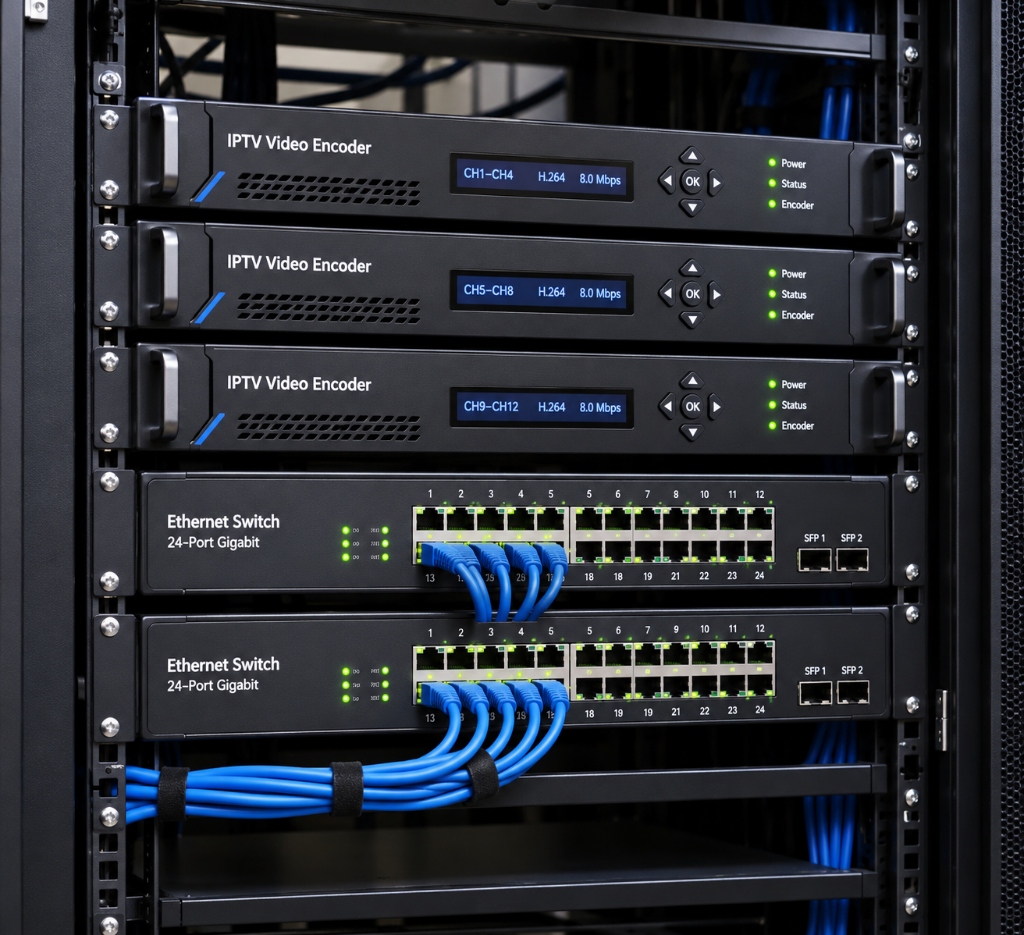
Quick Technical Comparison: Consumer HDMI Converters vs Professional IPTV Encoders
Before purchasing equipment, understand the critical difference between a basic point-to-point HDMI-over-IP extender and a true network video streaming encoder:
| Hardware Category | HDMI Extender Balun (Point-to-Point) | Standalone HDMI IPTV Encoder | Multi-Channel IPTV Headend Rack |
|---|---|---|---|
| Primary Function | Send 1 HDMI source to 1 distant TV | Compress HDMI into IP network streams | Compress 4 to 24 channels simultaneously |
| Network Type | Dedicated Cat6 cable (cannot use router) | Standard LAN router / switch compatible | Commercial Gigabit / 10G managed switch |
| Supported Protocols | Proprietary uncompressed packet protocol | RTSP, RTMP, HLS, UDP Multicast, SRT | UDP Multicast, RTP, HLS, MPEG-TS |
| Client Devices | Requires proprietary physical receiver box | Any Smart TV, FireStick, PC, VLC, TiviMate | Unlimited endpoint TVs via Multicast |
| Average Cost | $60 – $120 per set | $180 – $450 per single channel | $1,200 – $4,500 per rackmount unit |
| Best Suited For | Connecting 1 cable box to 1 patio TV | Bars, churches, streaming rigs, gyms | Hotels, luxury resorts, hospital campuses |
💡 Pro Tip for Cord-Cutters: If you simply want to stream thousands of entertainment channels without buying commercial hardware, explore our best IPTV service in USA review to see how cloud delivery eliminates hardware headaches.
Technical Specifications: The Anatomy of a Video Encoder
Before choosing an iptv video encoder, verify that its technical specifications align with your network capabilities and destination displays:
Hardware Video Encoder Specification Matrix
HDMI 1.4, HDMI 2.0 (Type-A) & 3G-SDI / 12G-SDI (BNC)
H.265 / HEVC (Main Profile) & H.264 / AVC (High Profile)
AAC, AAC+, AAC++, MP3, G.711 (Embedded HDMI or 3.5mm Analog)
4K UHD (3840×2160 @ 60fps), 1080p @ 60fps, 720p
32 Kbps to 32,000 Kbps (CBR / VBR)
HTTP, HLS, RTSP, RTMP, RTMPS, UDP/RTP Multicast, ONVIF, SRT
Sub-150ms (Low-Latency LAN Mode) | 2 to 5 seconds (HLS Buffer)
1000M RJ45 Gigabit Ethernet with PoE options
How Does an IPTV Encoder Work? The Signal Conversion Pipeline
To understand how to convert hdmi to iptv, it helps to examine what occurs inside the device when uncompressed video enters the HDMI port:
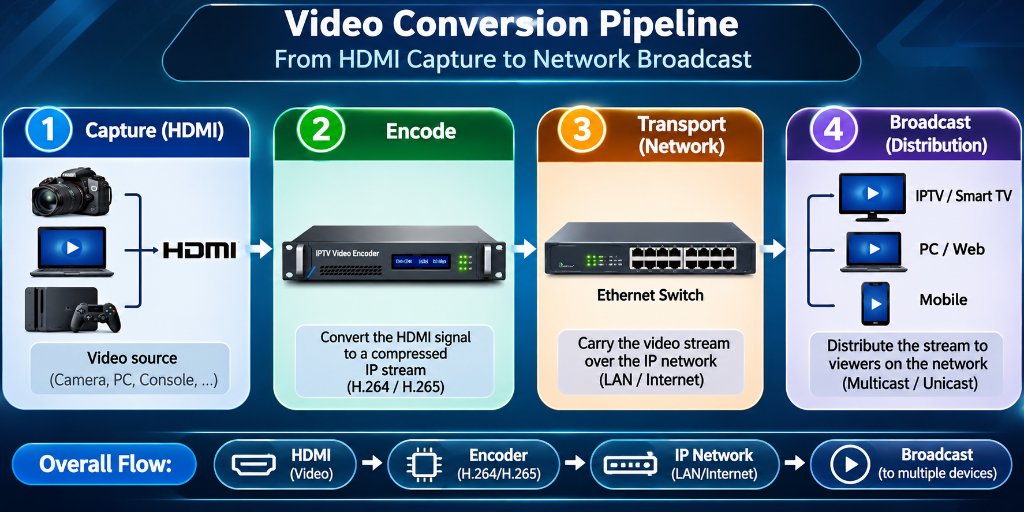
Step 1: Video Capture and Signal Ingest
Raw video from a media box, camera, or PC travels through an HDMI or SDI cable. High-end encoders feature an HDMI loop-through port, enabling you to feed a local confidence monitor or recording device with zero latency while simultaneously streaming the feed over IP.
Step 2: Hardware Compression (H.264 vs H.265)
An uncompressed 1080p stream generates roughly 3 Gbps of raw bandwidth, while an uncompressed 4K 60fps feed requires over 12 Gbps. Transmitting uncompressed video across a standard local network would instantly crash network switches. The encoder uses an onboard System-on-Chip (SoC) processor to compress the video:
- H.264 (AVC): Highly compatible with older smart TVs and web browsers, but requires roughly 8 to 12 Mbps for clean 1080p video.
- H.265 (HEVC): Essential for any 4k iptv encoder. H.265 offers 40% to 50% better compression efficiency, delivering crystal-clear 4K video at only 12 to 18 Mbps.
Step 3: Audio Multiplexing
The encoder captures digital audio embedded within the HDMI stream (or via a separate 3.5mm line-in jack) and compresses it into stereo or surround sound using AAC codecs, ensuring accurate lip-sync alignment with the compressed video frames.
Step 4: IP Protocol Packaging and Network Broadcast
The compressed data is wrapped into an IP transport container based on your destination:
- RTSP (Real-Time Streaming Protocol): Ultra-low latency (under 200ms), perfect for internal closed-circuit systems and security feeds.
- UDP / RTP Multicast: Sends a single stream across the network switch that hundreds of televisions can tune into without multiplying network bandwidth.
- HLS (HTTP Live Streaming): Slices video into short files, ideal for streaming to smartphones and web browsers over Wi-Fi.
- RTMP / SRT: The standard for transmitting live video across the public internet to remote cloud servers or platforms like YouTube and Twitch with error correction.
Step-by-Step Tutorial: How to Set Up an IPTV Encoder
Follow this practical configuration walkthrough to convert your first HDMI source into a live IP stream:
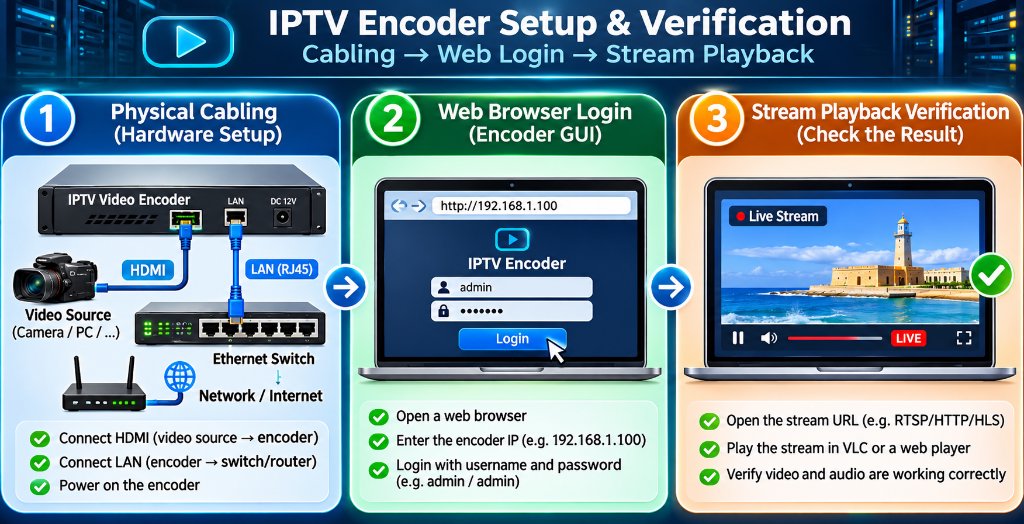
Step 1: Physical Cabling
- Connect your HDMI source (cable box, PC, camera) to the encoder HDMI IN port.
- Connect a Cat6 Ethernet cable from the encoder RJ45 port to your network switch.
- Plug in the 12V DC power adapter and verify the power and network LEDs illuminate.
Step 2: Access the Web Configuration GUI
- Check the user manual for the default factory IP address (commonly
192.168.1.168). - Configure your computer Ethernet adapter to the same subnet (e.g.,
192.168.1.100). - Open Chrome or Firefox and enter
http://192.168.1.168. - Log in with default administrator credentials (typically
admin / admin).
Step 3: Configure Encoding Parameters
- Navigate to the “Video & Encoding” tab.
- Select Video Codec: Choose H.265 (for 4K streams) or H.264 (for 1080p).
- Set Bitrate Control: Select CBR (Constant Bitrate) at 12,000 Kbps.
- Set Frame Rate: Select 60 fps for smooth sports motion.
Step 4: Enable Streaming Protocols
- In the “Stream Output” tab, toggle your desired protocol:
- Enable RTSP: Port 554 (e.g.,
rtsp://192.168.1.168:554/live/ch0) - Enable HLS: Port 8080 (e.g.,
http://192.168.1.168:8080/live/ch0.m3u8) - Enable Multicast: Address
238.0.0.1:1234(for multi-TV LAN distribution)
Step 5: Verify Playback on Client Devices
- Open VLC Media Player on a computer or TiviMate on an Amazon FireStick.
- Select “Open Network Stream” and paste your encoder URL.
- Confirm crisp, low-latency video and audio playback.
When utilizing UDP Multicast across commercial networks, always ensure your network switch has IGMP Snooping enabled. Without IGMP Snooping, multicast video packets flood every connected port, which can overwhelm office printers, Wi-Fi access points, and VoIP phone systems.
What is the Best IPTV Encoder for Different Commercial Environments?
Choosing what is the best iptv encoder depends entirely on your deployment scale, physical distance, and number of channels:
1. Which IPTV Encoder is Best for Hotels?
Hotels require high-density, multi-channel rackmount units capable of operating 24 hours a day with zero maintenance.
Top Choice: Multi-channel rackmount encoders from manufacturers like Kiloview (Cradle Series), TBS, or ZeeVee.
Key Feature Needed: Support for 8 to 24 HDMI inputs in a single 1U chassis, outputting UDP Multicast streams directly into hotel smart TVs running hospitality middleware.
2. The Best IPTV Encoder for Sports Bars and Restaurants
Sports bars typically need to distribute 8 to 16 satellite feeds to dozens of screens around the dining room.
Top Choice: URayCoder 8-Channel HDMI Encoder or Osprey Talon Series.
Key Feature Needed: Low-latency RTSP and UDP streaming, low power consumption, and independent web control per channel so bartenders can switch sources from an iPad.
3. Broadcast Studios and Live Venues: When to Choose an SDI IPTV Encoder
If your video cameras are located more than 30 feet away from your equipment rack, standard HDMI cables suffer severe signal degradation.
Top Choice: An sdi iptv encoder (such as the Kiloview E1-s or Magewell Ultra Stream SDI).
Key Advantage: SDI cables use heavy-duty coaxial cabling with locking BNC connectors that carry broadcast-grade video over 300 feet with zero latency or jitter.
Building an On-Premise IPTV Headend vs Subscribing to an IPTV Service
Understanding the cost and engineering required to build a physical iptv headend highlights why cloud-hosted services have become so popular:
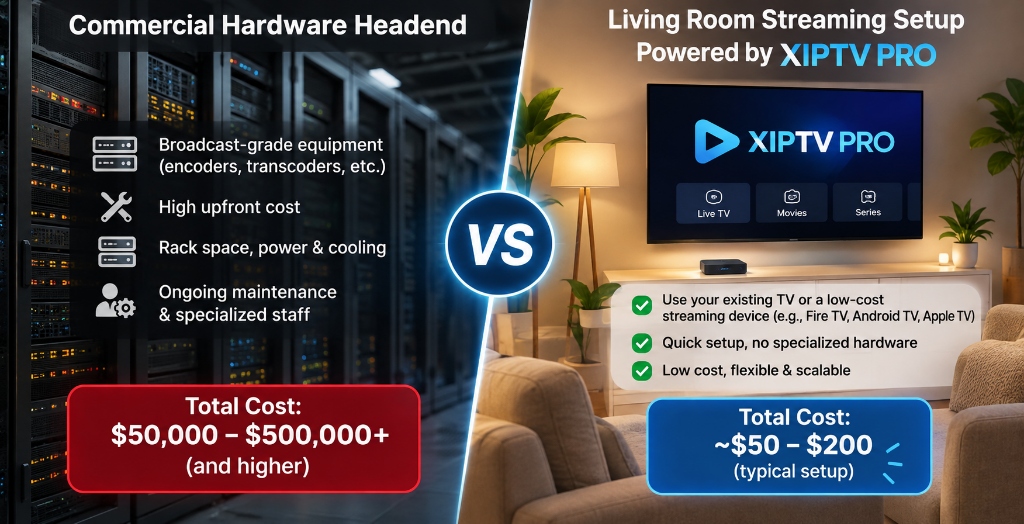
If a business or homeowner wants to create an on-premise IPTV system with 100 channels, here is the real financial equation:
Real Costs of Building a Physical 100-Channel Headend
- 100 Satellite/Cable Receivers: $10,000 – $15,000
- Multi-Channel Hardware Encoders (100 ports): $15,000 – $25,000
- Commercial Managed Switches & Server Racks: $3,000 – $5,000
- Air-Conditioned Server Room & Power Backup: $4,000+
- Total Initial Investment: Over $32,000 (plus thousands in monthly electricity and technician maintenance).
While this infrastructure is necessary for 500-room luxury resorts or stadium hospitality suites, it is completely impractical for standard businesses, sports lounges, or home entertainment.
Modern cloud providers like XIPTV PRO operate industrial tier-4 headends on your behalf. By encoding 25,000+ channels on enterprise server clusters and routing video through 10Gbps CDN nodes with Anti-Freeze 10.0 protocols, you get instant broadcast-grade 4K streaming for just a few dollars a month. For a detailed breakdown of server uptime and speed tests, check our best IPTV service in USA review.
Transparent Pricing: Enterprise 4K Streaming for a Few Dollars a Month
Rather than investing thousands in video encoder hardware, you can tap into XIPTV PRO’s complete pre-encoded streaming infrastructure for less than the cost of a single HDMI cable:
| Subscription Plan | Total Price | Effective Monthly Cost | Channels & VOD Included | Direct Access |
|---|---|---|---|---|
| 1-Month USA IPTV Pass | $11.99 | $11.99 / mo | 25,000+ live 4K channels, 130K VOD, 24/7 support | View 1-Month Pass → |
| 3-Months USA IPTV Pass | $29.99 | $10.00 / mo | Full out-of-market sports and movie library | View 3-Months Pass → |
| 6-Months USA IPTV Pass | $44.99 | $7.50 / mo | Complete seasonal sports coverage | View 6-Months Pass → |
| 1-Year Premium Pass (Best Value) | $69.99 | $5.83 / mo | Maximum annual savings, instant setup, 7-day guarantee | Order 1-Year Pass → |
| 2-Years Ultimate Pass | $119.99 | $5.00 / mo | Long-term cord-cutters locking in the lowest rate | View 2-Years Pass → |
Every pass connects directly to popular player apps like TiviMate and IPTV Smarters Pro on FireStick, Smart TVs, and mobile devices with zero hardware configuration required on your end.
Frequently Asked Questions
What is an HDMI to IPTV converter?
An HDMI to IPTV converter is a dedicated hardware video encoder that takes an HDMI video signal from a camera, media box, or PC, compresses it in real time using H.264 or H.265 codecs, and outputs it as an IP stream across an Ethernet network.
How do you set up an IPTV encoder?
To set up an IPTV encoder, connect your video source to the HDMI input, plug an Ethernet cable from the encoder into your local network router, log into the encoder web management GUI using its default IP address, configure the video codec and bitrate, and enable your desired streaming protocol like RTSP or HLS.
Which IPTV encoder is best for hotels?
Hotels require multi-channel rackmount IPTV encoders that support UDP/RTP multicast streaming, H.265 compression, and IGMP snooping. Multi-channel encoders from brands like Kiloview, TBS, or ZeeVee allow hoteliers to distribute multiple guest channels over standard Cat6 cabling without overwhelming network switches.
What is the difference between an HDMI encoder and an SDI IPTV encoder?
HDMI encoders are primarily used for consumer and commercial media devices over short cable runs under 30 feet. SDI IPTV encoders utilize professional BNC locking connectors designed for broadcast cameras and studio production, supporting cable runs exceeding 300 feet with zero signal loss.
Is it cheaper to build a local IPTV headend or subscribe to an IPTV service?
Building a local IPTV headend requires thousands of dollars in dedicated encoders, satellite receivers, and commercial switches, which makes sense only for businesses distributing proprietary local video. For entertainment, subscribing to a managed service like XIPTV PRO gives you access to 25,000+ pre-encoded 4K channels for as low as $5.83 per month.
Related Guides & Technical Resources
Continue exploring advanced video streaming with our technical guides:
- Best IPTV Service in USA (2026 Complete Review): In-depth testing of server uptime, CDN speed, and multi-device compatibility.
- How to Watch Sports Without Buffering: Router QoS, bandwidth allocation, and protocol optimization for live sports.
- Cable TV vs IPTV Cost Comparison: Why digital streaming saves households over $1,100 annually.
Conclusion: Bridging Physical Video and IP Networks
Knowing how to convert HDMI to IPTV provides unmatched control over private video distribution. Whether you are modernizing a 40-screen sports bar, broadcasting church services across campus overflow rooms, or designing an interactive hotel television system, hardware video encoders deliver clean, low-latency streams without running bulky video cables.
Yet for home entertainment and sports viewing, deploying on-premise hardware is unnecessary. By choosing XIPTV PRO, you tap into commercial-grade encoding infrastructure and dedicated Anti-Freeze CDN servers for only $5.83 per month.
Ready to Stream 25,000+ Live 4K Channels With Zero Hardware Hassle?
Skip the $32,000 headend hardware investment. Get instant automated activation, 99.9% uptime, and complete NFL, NBA, UFC, and Hollywood VOD access today.
🔒 Backed by our risk-free 7-day money-back guarantee. Instant credentials delivery within 2 minutes.
Alex Mercer
Lead Streaming & Network Engineer at XIPTV PRO
Alex has 8+ years of experience evaluating video streaming hardware, multi-channel headends, low-latency CDN distribution, and enterprise IPTV network protocols.
HDMI Encoder for IPTV: Complete 4K Hardware Streaming and Setup Guide (2026)
Table of Contents
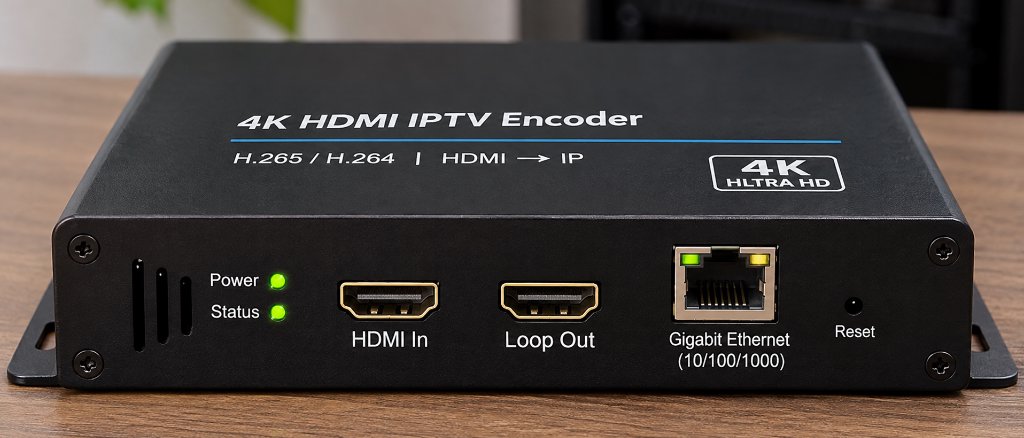
An HDMI encoder for IPTV is a specialized hardware device that captures uncompressed high-definition or 4K video from any HDMI source – such as cable set-top boxes, video cameras, gaming consoles, or media servers – compresses the signal in real time using advanced codecs like H.264 or H.265 (HEVC), and converts it into standard IP streaming protocols (such as RTSP, RTMP, HTTP Live Streaming, or UDP Multicast) for transmission across local networks or the internet.
In commercial environments like sports bars, college campuses, fitness centers, corporate offices, and hospitality venues, the hdmi encoder iptv setup has become the industry standard for distributing video to dozens of screens without running bulky, expensive HDMI matrix cables.
However, understanding the mechanics of hdmi iptv hardware, configuring protocols like RTSP, RTMP, and SRT, and calculating network bandwidth can quickly overwhelm newcomers. Moreover, many home users mistakenly purchase costly broadcast encoders when a managed cloud IPTV solution provides tens of thousands of pre-configured live streams for a fraction of the cost.
This comprehensive guide breaks down the core architecture of the hdmi encoder iptv ecosystem, compares hardware configurations against cloud-hosted alternatives like XIPTV PRO, and provides step-by-step installation instructions for your network.
Quick Comparison: Standalone Hardware Encoder vs Managed Cloud IPTV Service
Before investing hundreds of dollars into dedicated video hardware, consider how on-premise encoding contrasts with a managed cloud IPTV subscription:
| Evaluation Factor | Standalone HDMI IPTV Encoder | Managed Cloud IPTV Service (XIPTV PRO) |
|---|---|---|
| Primary Purpose | Distribute a single private HDMI source over IP | Stream 25,000+ live global TV channels & VOD |
| Initial Hardware Cost | $180 – $600 per channel | $0.00 (Runs on existing FireStick/Smart TV) |
| Channel Capacity | 1 channel per physical HDMI input port | 25,000+ live channels included out-of-the-box |
| Maintenance & Setup | Complex (Requires router, IP static mapping) | Simple (Instant 2-minute activation code) |
| Video Resolution | 1080p to 4K 60fps (depending on model) | 4K UHD, Full HD, and HD streams included |
| Best Suited For | Bars, gyms, studios, private venue broadcasts | Home cord-cutters, sports fans, movie binging |
| Ongoing Operating Cost | Electricity and hardware depreciation | $5.83 / mo (with 1-Year Premium Pass) |
For venues broadcasting local camera feeds or proprietary video signage, an on-premise encoder is indispensable. However, for users seeking multi-channel entertainment, sports, and international television without managing hardware racks, exploring the 1-Year USA IPTV Premium Pass provides immediate access to 25,000+ live 4K streams at a fraction of hardware costs.
Technical Specifications: The Anatomy of an IPTV Encoder
To evaluate any commercial hdmi iptv encoder, review these fundamental hardware and protocol baselines:
HDMI 1.4 / HDMI 2.0 (Type-A) with local loop-through
H.265 / HEVC (High Efficiency) & H.264 / AVC (Baseline/Main/High)
80ms – 200ms (Low Latency Mode) | 1.5s – 4.0s (HLS / Buffer Mode)
32 Kbps to 32,000 Kbps (CBR / VBR selectable)
AAC, AAC+, AAC++, MP3, AC3 passthrough (Stereo / 5.1)
HTTP, HLS, RTSP, RTMP, RTMPS, UDP/RTP Multicast, ONVIF, SRT
1000M RJ45 Gigabit Ethernet port (Optional 802.3af PoE)
Embedded Web GUI (HTTP), Telnet, REST API, or Cloud CMS
How an HDMI to IPTV Encoder Actually Works
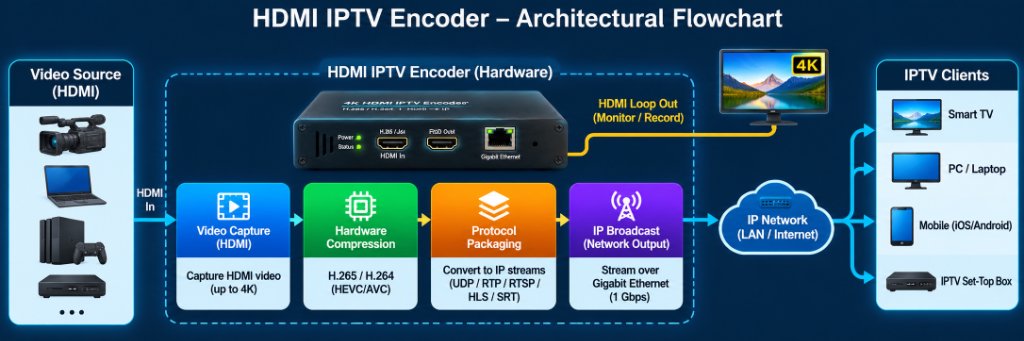
The transformation of raw uncompressed video into lightweight network packets occurs in four synchronous stages inside the device:
1. HDMI Video Capture and EDID Handshake
When you connect a video source (such as a cable receiver, video camera, or PC) to the encoder’s HDMI input port, the encoder performs an Extended Display Identification Data (EDID) handshake. This informs the source device of the supported resolutions (e.g., 3840×2160 @ 60Hz or 1920×1080 @ 60Hz) and audio formats.
2. Hardware Video Compression (H.264 vs H.265 HEVC)
Uncompressed 1080p video generates over 3 Gbps of raw data, and 4K at 60fps exceeds 12 Gbps – far beyond what standard Gigabit Ethernet networks can comfortably carry. The encoder features a dedicated hardware System-on-Chip (SoC) that compresses the video in real time:
- H.264 (AVC): The legacy standard. Compatible with virtually every screen, phone, and older smart TV. However, it requires higher bitrates (8-12 Mbps for 1080p60) to maintain crisp fidelity.
- H.265 (HEVC): The modern gold standard for any 4k iptv encoder. H.265 achieves approximately 40% to 50% better compression efficiency than H.264 at equivalent visual quality. This enables pristine 4K sports and movie streaming at manageable bitrates of 12 to 18 Mbps, cutting network congestion in half.
3. Protocol Packaging and Multiplexing
Once compressed, the video and audio packets are packaged into an IP transport container. Modern iptv encoders support multiple simultaneous streaming protocols:
- HTTP / HLS (HTTP Live Streaming): Slices the video into short `.ts` or fMP4 segments indexed by an `.m3u8` playlist. Ideal for Apple TV, Safari, and web browsers, though it introduces 3 to 10 seconds of playback latency.
- RTSP (Real-Time Streaming Protocol): The standard for local closed-circuit streaming and surveillance. Highly compatible with VLC Player and TiviMate, delivering sub-second glass-to-glass latency.
- RTMP / RTMPS: The workhorse protocol for broadcasting to live platforms like YouTube Live, Facebook, and Twitch.
- UDP / RTP Multicast: Transmits a single stream that multiple smart TVs or IPTV set-top boxes can tune into simultaneously without consuming additional switch bandwidth – critical for large venues.
- SRT (Secure Reliable Transport): A modern open-source protocol that combines low latency (under 200ms) with packet-recovery mechanisms to maintain rock-solid stability even over lossy internet connections.
4. IP Stream Distribution Across Your Local Network
The encoder assigns the stream to a local IP address and port (for example, rtsp://192.168.1.168:554/live/ch0). Any client device connected to the same LAN – whether a smart TV, an Amazon FireStick, an Apple TV, or a PC running VLC – can open that network URL and display the live broadcast with zero additional hardware.
Commercial and Real-World Applications for IPTV Encoders
Why do businesses and power users invest in dedicated iptv encoders? The technology solves several difficult physical distribution challenges:
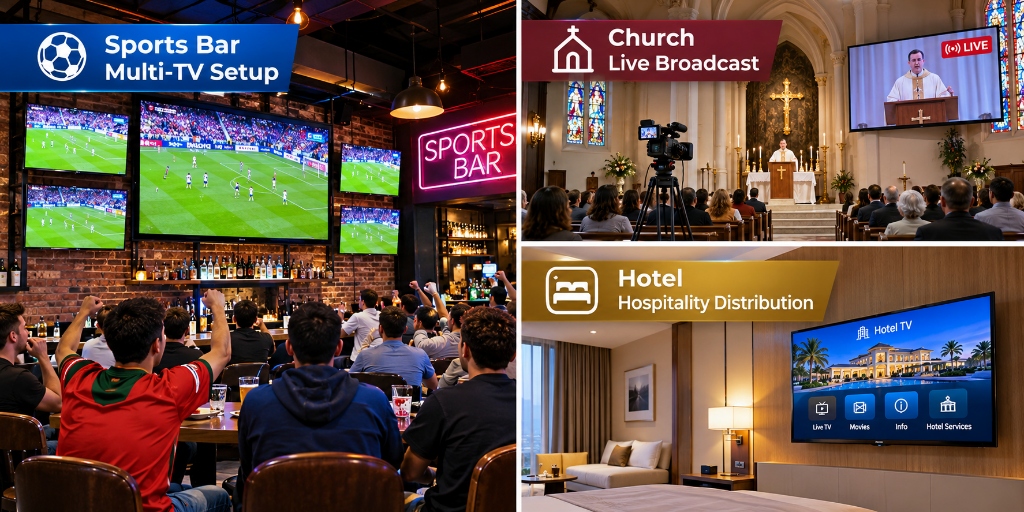
1. Sports Bars, Restaurants, and Fitness Centers
In a commercial sports bar with 30 television screens, running long HDMI cables from a central cable box to every TV requires expensive HDMI matrix switchers, signal repeaters, and thick conduit. High-definition HDMI signals degrade significantly over distances exceeding 50 feet without active optical cabling.
By installing a bank of multi-channel hdmi encoder for iptv units in the server room, the bar converts satellite or cable receiver feeds into multicast IP streams. The video travels over existing Cat6 network cables straight into smart TVs or cheap media players. Bartenders can switch channels on any TV instantly using a simple tablet or remote control interface.
2. Houses of Worship, Education, and Corporate Signage
Churches and college campuses use HDMI encoders to broadcast main sanctuary cameras or lecture hall podiums to overflow rooms, nursery screens, and foyer digital signage. The same encoder can simultaneously push an RTMP feed to online audiences via YouTube or Facebook Live while streaming low-latency RTSP feeds across the building’s internal Wi-Fi network.
3. Private Home Lab Restreaming
Enthusiasts frequently use a single hdmi to iptv encoder to capture a local cable box or gaming console and restream it into media center software like Plex, Emby, or Channels DVR. This allows homeowners to watch their primary living room cable feed on any bedroom TV, tablet, or phone throughout the house without renting additional set-top boxes.
Step-by-Step Configuration: How to Setup an HDMI IPTV Encoder
Setting up an encoder on your local area network involves five straightforward steps:
• Connect HDMI Source → Encoder HDMI IN
• Connect Ethernet Cable → Encoder RJ45 → Network Switch/Router
• Connect Power Adapter (12V DC) → Power LED turns Solid Green
• Default Encoder IP is typically
192.168.1.168 (check user manual)• Set your computer to the same subnet (e.g.,
192.168.1.100)• Open a web browser and enter
http://192.168.1.168• Login with default credentials (usually
admin / admin)
• Navigate to “Encoding Settings”
• Select Video Codec: H.265 (for 4K) or H.264 (for 1080p)
• Set Resolution: 3840×2160 (or match source)
• Set Frame Rate: 60 fps
• Select Bitrate Control: CBR (Constant Bitrate) at 12,000 Kbps
• Under “Stream Settings”, toggle ON your desired outputs:
– Enable RTSP: Port 554
– Enable HTTP / HLS: Port 8080 (produces
/live.m3u8)– Enable Multicast:
238.0.0.1:1234 (for multi-screen LAN broadcast)
• Open VLC Player or TiviMate on your FireStick
• Select “Open Network Stream”
• Paste your encoder URL:
rtsp://192.168.1.168:554/live/ch0• Verify smooth, low-latency video playback
The Big Picture: Hardware Encoders vs Cloud-Hosted IPTV Services
While owning a hardware iptv encoder provides total control over a local video feed, it has significant architectural limitations for general television entertainment:
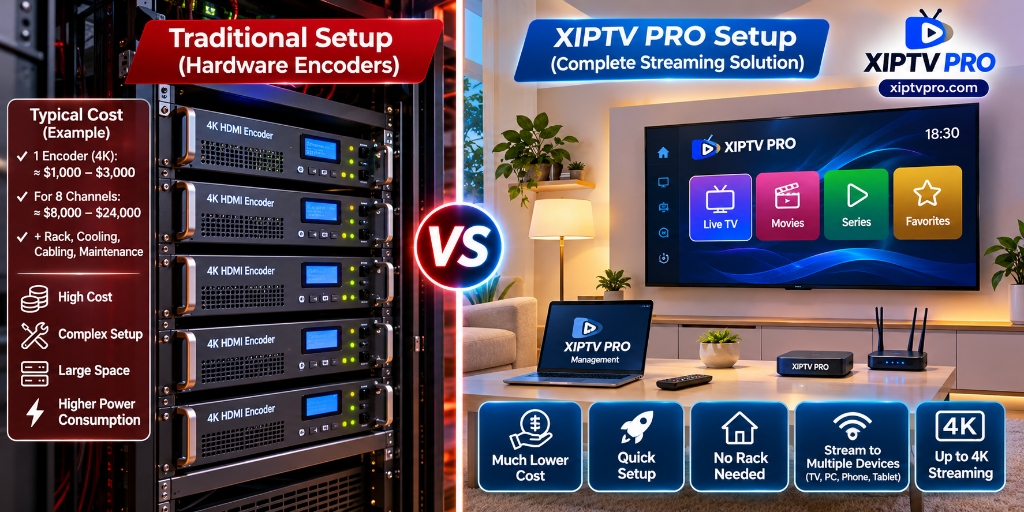
If you want to watch hundreds of out-of-market sports games, thousands of live news and entertainment channels, and extensive on-demand video libraries, physical encoders are mathematically impractical. Building an 8-channel headend requires eight physical cable boxes, eight 4K encoders ($2,000+), rack mounting, commercial cooling, and thousands of dollars in annual equipment subscriptions.
Modern managed providers like XIPTV PRO operate massive enterprise headends in secure cloud datacenters with redundant 10Gbps CDN uplinks. Instead of maintaining physical boxes in your living room or closet, you simply connect your FireStick, Smart TV, or phone to pre-optimized 4K 60fps streams with zero hardware investments.
For a detailed financial comparison of traditional cable equipment versus IPTV streaming, review our cable TV vs IPTV cost comparison guide and learn how to maintain flawless playback in our guide on watching sports without buffering.
Transparent Pricing: Accessing Enterprise 4K Streams for Pennies a Day
Instead of spending $300 or more on a single-channel encoder box, you can access over 25,000 live 4K and FHD channels, live sports passes, and 130,000+ movies through XIPTV PRO without contracts or hardware installations:
| Subscription Plan | Total Price | Effective Monthly Cost | Key Features Included | Direct Access |
|---|---|---|---|---|
| 1-Month USA IPTV Pass | $11.99 | $11.99 / mo | 25,000+ live 4K channels, 130K VOD, 24/7 support | View 1-Month Pass → |
| 3-Months USA IPTV Pass | $29.99 | $10.00 / mo | Full sports and entertainment package | View 3-Months Pass → |
| 6-Months USA IPTV Pass | $44.99 | $7.50 / mo | Regular season sports and movie library access | View 6-Months Pass → |
| 1-Year Premium Pass (Best Value) BEST VALUE | **$69.99** | **$5.83 / mo** | Maximum annual savings, instant setup, 7-day guarantee | Order 1-Year Pass → |
| 2-Years Ultimate Pass | $119.99 | $5.00 / mo | Lowest monthly rate for long-term cord-cutters | View 2-Years Pass → |
Every pass connects seamlessly to standard media players including TiviMate, IPTV Smarters Pro, and VLC. Review all plan tiers on the XIPTV PRO Shop.
Frequently Asked Questions
Q: What internet upload speed do I need for an HDMI IPTV encoder?
If you stream across your internal local network (LAN), your internet upload speed is irrelevant because traffic stays inside your Gigabit switch. However, if you plan to broadcast an encoder feed across the public internet (for remote viewing or YouTube Live), you need a reliable upload speed of at least 15 to 20 Mbps per 4K H.265 stream, or 8 to 10 Mbps for 1080p H.264.
Q: Can an HDMI IPTV encoder bypass HDCP copy protection?
Standard commercial HDMI encoders comply with international digital copy protection standards (HDCP). When connected to a protected HDCP 2.2 output (such as certain commercial set-top boxes or Blu-ray players), the encoder will output a black screen or an HDCP error banner. Professional broadcast installations resolve this by deploying active HDMI splitters or distribution amplifiers with EDID management.
Q: What is the difference between an IPTV encoder and an IPTV set-top box?
An IPTV encoder is an input/transmitting device: it takes a video feed (HDMI) and packages it into an IP network stream. An IPTV set-top box (such as an Amazon Fire TV Stick, Apple TV, or MAG box) is an output/receiving device: it connects to the network, decodes an IP stream, and displays it on your television screen.
Q: Why does HLS protocol introduce a delay on IPTV streams?
HLS chunks continuous live video into small file segments (usually 2 to 6 seconds each) and requires the player to buffer at least two or three segments before beginning playback. This architecture ensures smooth playback over fluctuating internet connections but inherently introduces 6 to 15 seconds of latency compared to real-time protocols like RTSP or UDP multicast.
Related Guides & Technical Resources
Deepen your video streaming knowledge with our companion guides:
- ⭐ Best IPTV Service in USA (2026 In-Depth Review): Complete evaluation of server uptime, CDN speeds, and 4K channel stability.
- ⚡ How to Watch Sports Without Buffering: Advanced router tuning, buffer cache configuration, and anti-ISP throttling techniques.
- 💰 Cable TV vs IPTV Cost Comparison: Mathematical breakdown showing how cord-cutters eliminate equipment fees and save $1,200 annually.
Conclusion: Mastering the IPTV Video Pipeline
The hdmi encoder for iptv represents a powerful bridge between physical video signals and modern digital IP networks. Whether you are distributing closed-circuit security feeds across an enterprise building, routing live game feeds to 30 screens in a sports bar, or building a high-end home streaming lab, choosing the right H.265 hardware and low-latency protocol (SRT or RTSP) ensures crystal-clear video delivery.
Yet for home entertainment, sports enthusiasts, and movie lovers, building your own hardware headend is costly and complex. With XIPTV PRO, you gain instant access to an enterprise-grade cloud streaming backend – delivering 25,000+ live 4K channels and all major sports passes straight to your living room for just $5.83 per month.
Ready to Experience High-Speed 4K Streaming?
Skip the expensive hardware racks and enjoy over 25,000 live channels and 130,000+ on-demand titles with our risk-free 7-day money-back guarantee:
Instant Activation via Email • Xtream Codes API & M3U • 24/7 Human Support
Xtream Codes API vs M3U Playlist (2026 4K IPTV USA Guide)
Table of Contents
Understanding Xtream Codes API vs M3U Playlist in 2026
Comparing xtream codes api vs m3u playlist connection methods is essential for anyone setting up a modern 4K streaming device in the United States. Whenever you activate an IPTV USA subscription with XIPTV PRO, your automated welcome email provides both an M3U Plus URL and Xtream Codes API login details (Server URL, Username, and Password).
While the classic M3U Multimedia Playlist Specification (Wikipedia) was originally created in the late 1990s as a plain-text file format for audio players, Xtream Codes API uses structured JSON requests designed specifically for massive live TV and Video-on-Demand catalogs.
In this 2026 technical breakdown of xtream codes api vs m3u playlist protocols, we explain why choosing the right login option makes your Electronic Program Guide (EPG) load up to 5 times faster on FireStick, Android TV, Apple TV, and Smart TVs.
Technical Comparison: Xtream Codes API vs M3U Playlist
Here is how xtream codes api vs m3u playlist performance compares across the metrics that matter most to daily viewers:
| Performance Metric | Xtream Codes API (Recommended) | M3U Plus Playlist URL |
|---|---|---|
| Remote Control Typing | Easy (Short Server Host + Username/Pass) | Difficult (120+ character URL string) |
| TV Guide (EPG) Sync | Automatic (Built into API login) | Manual (Requires separate XMLTV URL) |
| 130,000+ VOD Handling | Dynamic On-Demand Loading (Zero RAM lag) | Parses huge static text file on startup |
| 7-Day Catch-Up TV | 100% Native Support | Limited player compatibility |
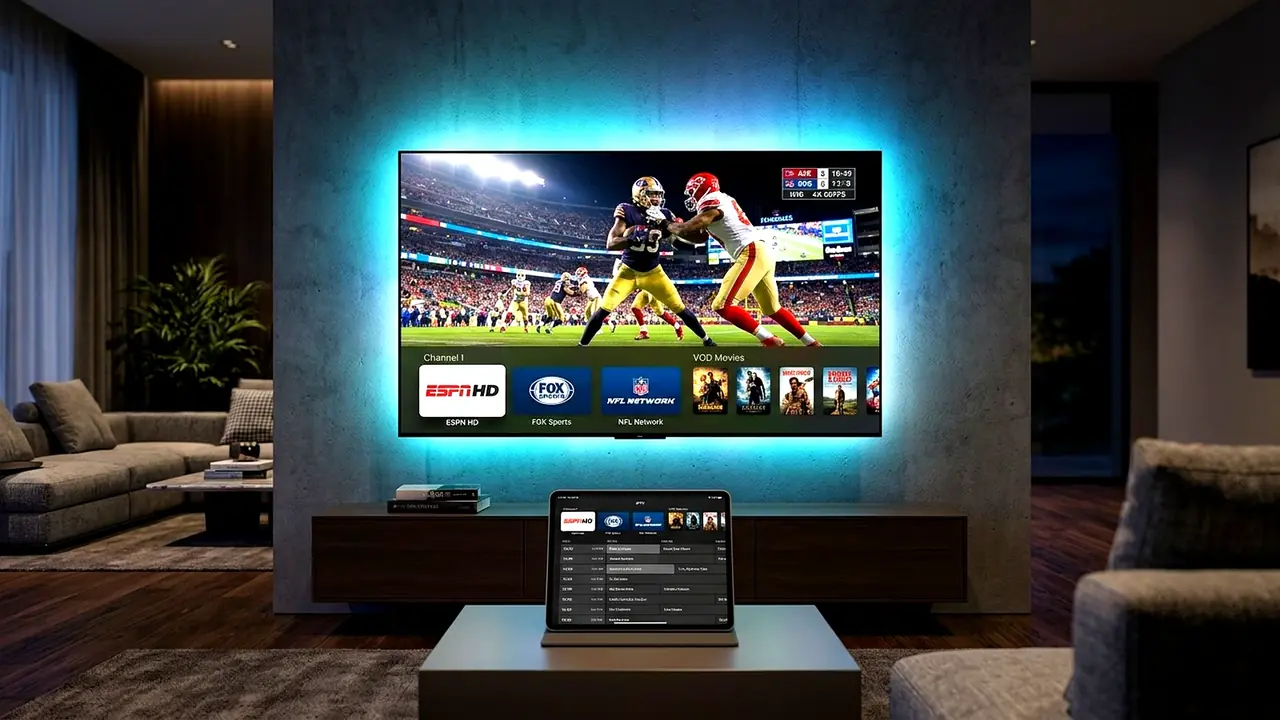
Why Xtream Codes API Wins for 25,000+ Channels & VOD
When evaluating xtream codes api vs m3u playlist on devices with 2GB of RAM – such as the Amazon FireStick 4K – loading a raw M3U file containing 25,000 live channels and 130,000 movies forces the device to download and parse a 90MB text file every time you open the app.
By contrast, Xtream Codes API fetches Live TV categories, VOD movie posters, IMDb ratings, and EPG schedules dynamically via lightweight JSON endpoints. Whether you follow our TiviMate FireStick setup guide or our IPTV Smarters Pro FireStick setup tutorial, Xtream Codes API is the gold standard.
When Should You Still Use an M3U Plus URL?
In the xtream codes api vs m3u playlist debate, M3U links remain useful in two specific scenarios:
- Desktop Media Players (VLC & Kodi): If you stream on a Windows PC or MacBook using VLC Media Player, pasting an M3U Plus URL takes two clicks.
- Legacy Smart TV Apps: Older Smart TV players (such as SS IPTV or Smart IPTV) only accept direct M3U URLs.
Thankfully, every 1 Year USA IPTV Premium Pass includes both credentials in your activation email at no extra charge.
Security & Server Load Balancing Benefits: Beyond faster guide synchronization, comparing xtream codes api vs m3u playlist architecture reveals major reliability advantages during peak US prime-time hours. With Xtream Codes API, your media player authenticates cleanly via encrypted JSON tokens and automatically receives the lowest-ping US CDN edge server from our 48-node cluster, preventing playlist timeouts and keeping channel switching under 0.5 seconds.
Conclusion
Now that you understand the difference between xtream codes api vs m3u playlist setups, you can configure your media player for maximum speed and stability. Choose your XIPTV PRO USA IPTV plan today for instant 2-minute delivery of both Xtream Codes API and M3U Plus credentials.
Watch NFL Sunday Ticket IPTV USA & UFC PPV in 4K (2026 Guide)
Table of Contents
Why Fans Watch NFL Sunday Ticket IPTV USA in 2026
Every football season, millions of American sports fans search for a reliable way to watch nfl sunday ticket iptv usa broadcasts without paying over $479 for standalone streaming bundles or suffering from local blackout restrictions. In 2026, following your favorite franchise across CBS, FOX, ESPN, NBC, Amazon Prime, and NFL Network requires juggling five separate monthly subscriptions.
When you choose to watch nfl sunday ticket iptv usa through XIPTV PRO – the #1 rated IPTV USA provider, every out-of-market Sunday afternoon game, NFL RedZone whip-around coverage, NBA League Pass matchup, and Saturday night UFC Pay-Per-View is included in one unified 4K pass.
You can verify weekly kickoff times on the Official NFL Broadcast & Schedule Guide and tune into dedicated home or away team feeds directly from your television remote.
Complete Sports Lineup: NFL, NBA, MLB & UFC PPV
Subscribers who watch nfl sunday ticket iptv usa with XIPTV PRO gain instant access to all regional, national, and international sports networks:
- Pro & College Football: All NFL Sunday Ticket game channels, NFL RedZone in 60FPS, NFL Network, ESPN/ABC Monday Night Football, and SEC/Big Ten NCAA networks.
- NBA, MLB & NHL: Complete NBA League Pass, MLB Extra Innings, NHL Center Ice, plus every Regional Sports Network (YES, NESN, Marquee, FanDuel/Bally Sports, NBC Sports Regional).
- UFC PPV & Championship Boxing: Every numbered UFC Pay-Per-View main card, Fight Night prelims, and heavyweight boxing events included at $0 extra PPV fee.
- Global Soccer & Motorsports: English Premier League (4K), UEFA Champions League, LaLiga, MLS Season Pass, and Formula 1 Sky F1 4K.
How to Watch NFL Sunday Ticket IPTV USA in True 60FPS
To watch nfl sunday ticket iptv usa without Sunday afternoon buffering, server proximity is everything. Overseas providers collapse under traffic spikes at 1:00 PM EST. XIPTV PRO routes all live sports feeds through 5 Tier-4 US Data Centers (New York, Chicago, Dallas, Miami, and Los Angeles) backed by 48 Anti-Freeze 10.0 edge CDN nodes.
Pair our 1 Year USA IPTV Premium Pass with TiviMate or UHF to watch up to 4 live football games simultaneously on a single 4K screen using Multi-View!
Cost Breakdown: Traditional Sports Add-Ons vs XIPTV PRO
See how much American households save when they watch nfl sunday ticket iptv usa on XIPTV PRO compared to fragmented cable and streaming packages:
| Sports Package | Standalone Annual Cost | XIPTV PRO 1-Year Pass |
|---|---|---|
| Base Live TV + NFL Sunday Ticket | $1,350+ / year | Included ($69.99 / year total) |
| NBA League Pass + RSNs | $280+ / year | Included |
| 12 Annual UFC Pay-Per-Views | $960+ / year ($79.99 each) | Included ($0 PPV fees) |
Read our companion guide on how to watch live sports on IPTV without freezing for home router optimization tips.
Zero Regional Blackouts Across All 50 States: Traditional cable and streaming packages enforce strict zip-code blackouts whenever a national broadcast overlaps with a regional game. When you watch nfl sunday ticket iptv usa on XIPTV PRO, you gain direct access to every local CBS, FOX, NBC, and ABC affiliate station from New York, Los Angeles, Dallas, Chicago, Miami, Philadelphia, and Boston – ensuring you never get locked out of a crucial division rivalry game.
Conclusion
Never miss a touchdown or championship knockout again. Watch nfl sunday ticket iptv usa in crystal-clear 4K 60FPS by choosing XIPTV PRO subscription plans today – complete with 2-minute automated delivery and our 7-day money-back guarantee.
Is IPTV Legal in USA? (2026 Legal Guide & Safe Streaming Tips)
Table of Contents
Demystifying IPTV Regulations in the United States
Is iptv legal in usa? Yes, IPTV technology itself is 100% legal in the United States and is widely used across the entire digital entertainment industry. Industry leaders such as YouTube TV, Hulu + Live TV, and Sling TV all deliver television programming using the exact same Internet Protocol Television technology.
Whenever consumers ask, is iptv legal in usa, they are usually inquiring about copyright compliance, subscriber privacy rights, and federal communications law. Because online media consumption has grown exponentially, understanding the regulatory landscape in 2026 helps streamers make informed, secure decisions.
In this comprehensive legal analysis, we examine federal communications statutes, explain the landmark Protecting Lawful Streaming Act, and highlight best practices to keep your home streaming experience safe and private.
Is IPTV Legal in USA? Understanding Federal Streaming Laws
To thoroughly address whether is iptv legal in usa, it is necessary to examine how United States law differentiates between underlying technology and copyright infringement. Internet Protocol Television is simply a communication mechanism – much like the World Wide Web or electronic mail. The protocol itself carries no legal liability.
In December 2020, the United States Congress enacted the Protecting Lawful Streaming Act (Congress.gov) as part of comprehensive copyright modernization. This legislation established two vital legal protections for consumers:
- Targeting Commercial Pirates: The statute specifically targets commercial entities that operate unauthorized redistribution services for direct financial profit. Federal enforcement is focused on unauthorized commercial operators, not individual household viewers.
- The End-User Exemption: Congressional lawmakers explicitly confirmed that everyday internet users who stream video content online are not subject to felony prosecution under the PLSA.
How User Privacy and Encryption Protect Your Streaming
Now that you know the answer to is iptv legal in usa, maintaining strong digital privacy should be your top priority. Premium providers like XIPTV PRO implement strict security measures to protect subscriber data:
- 256-Bit SSL/TLS Encryption: All account management, payment processing, and credential delivery are safeguarded using military-grade cryptographic encryption.
- Strict Zero-Logs Policy: We do not monitor, log, or store your viewing history, IP addresses, or streaming sessions. Your household viewing habits remain private.
- Open-Standard Video Players: XIPTV PRO operates seamlessly through trusted third-party players like TiviMate and IBO Player, requiring zero invasive proprietary software.
For additional peace of mind, many American streamers choose to use a Virtual Private Network (VPN). A VPN encrypts your home internet connection, preventing your internet service provider from tracking your browsing activity or artificially throttling video streaming speeds.
Guidelines for Safe & Secure IPTV Streaming in 2026
When considering is iptv legal in usa and choosing a service provider, follow these four practical rules:
- Avoid Unknown Free Portals: Free streaming websites frequently host malicious malware, tracking cookies, and phishing scripts designed to compromise your personal data.
- Choose Established US Providers: Select established services with dedicated server infrastructure, positive consumer reviews, and responsive 24/7 customer support.
- Demand Transparent Pricing in USD ($): Reliable providers offer clear pricing with zero hidden recurring fees or auto-renewing subscriptions.
- Compare Cost Savings: Learn how cord-cutting saves households thousands of dollars in our cable TV vs IPTV cost savings guide.
Conclusion
In summary, is iptv legal in usa? Absolutely. When you choose a reputable, privacy-focused service with high-speed US server infrastructure, you can stream with total confidence. Discover why over 25,000 American households trust XIPTV PRO subscription plans with our 100% risk-free 7-day money-back guarantee.
Cable TV vs IPTV Cost Comparison for 2026
Table of Contents
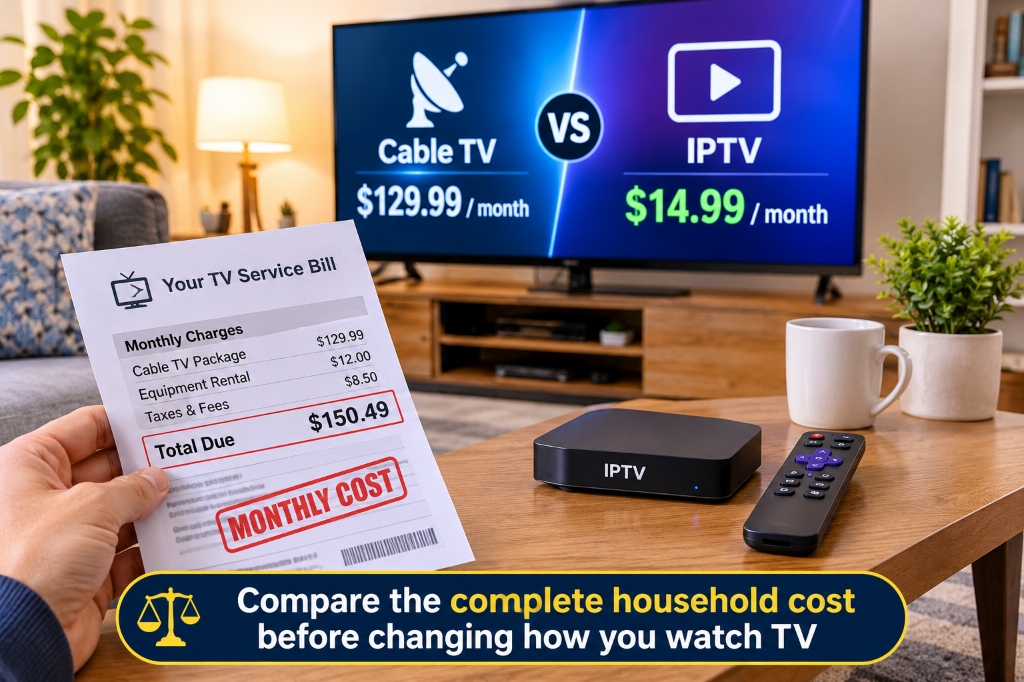
Cable TV vs IPTV is a comparison between a traditional television package and TV delivered over Internet Protocol networks. For a US household deciding whether to switch, the useful question is how much you will pay for the channels you watch, on the screens you use, over a full year.
A low subscription price can make switching attractive. The saving becomes clearer once you include internet, equipment, extra connections, and any subscriptions you still need. You might find a substantial reduction. You might also discover that your current bundle includes benefits you would otherwise buy separately.
This guide gives you a practical way to compare both options, using XIPTV PRO’s advertised prices and a clearly labeled household example. All figures are in US dollars, checked on November 1, 2026.
Cable TV vs IPTV at a glance
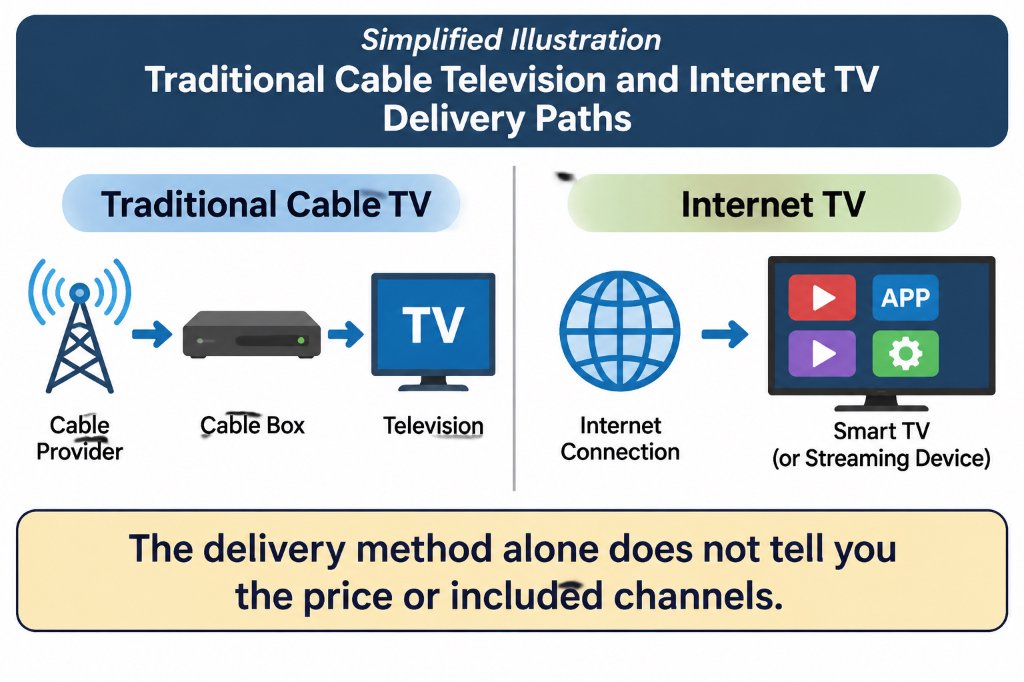
IPTV can reduce your TV spending when the complete replacement setup costs less and meets your viewing needs. The delivery technology does not guarantee a lower bill, better picture, or a particular channel lineup.
In technical usage, IPTV often refers to television on managed IP networks. Consumer websites also use the term more broadly for internet-delivered subscriptions. Services such as YouTube TV are commonly described as live TV streaming or OTT services. Treat each offer as its own product; they do not all share the same rights, features, or pricing.
Traditional providers also offer streaming apps. For example, Spectrum’s current plans include app-based viewing and selected streaming services. A cable subscription does not automatically mean a rented box on every television.
What the advertised prices actually buy
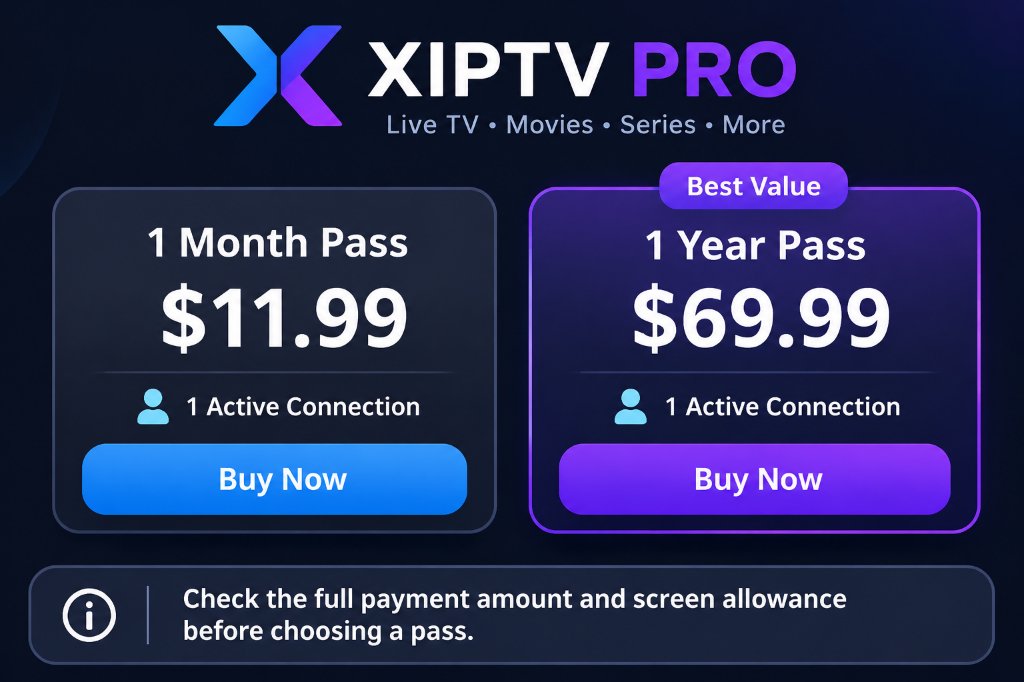
XIPTV PRO currently lists a one-month pass at $11.99 and a one-year pass at $69.99. The annual option has the lower effective monthly price, but you pay for the year upfront.
The XIPTV figures come from the current pricing section and product listings. Its price cards say tax is included. The 12-pass calculation assumes the monthly price remains unchanged throughout the year. Confirm the amount and terms shown when you purchase.
At these prices, the annual pass costs $73.89 less than buying 12 monthly passes. That is a comparison between two payment options, not a measure of how much you will save against cable.
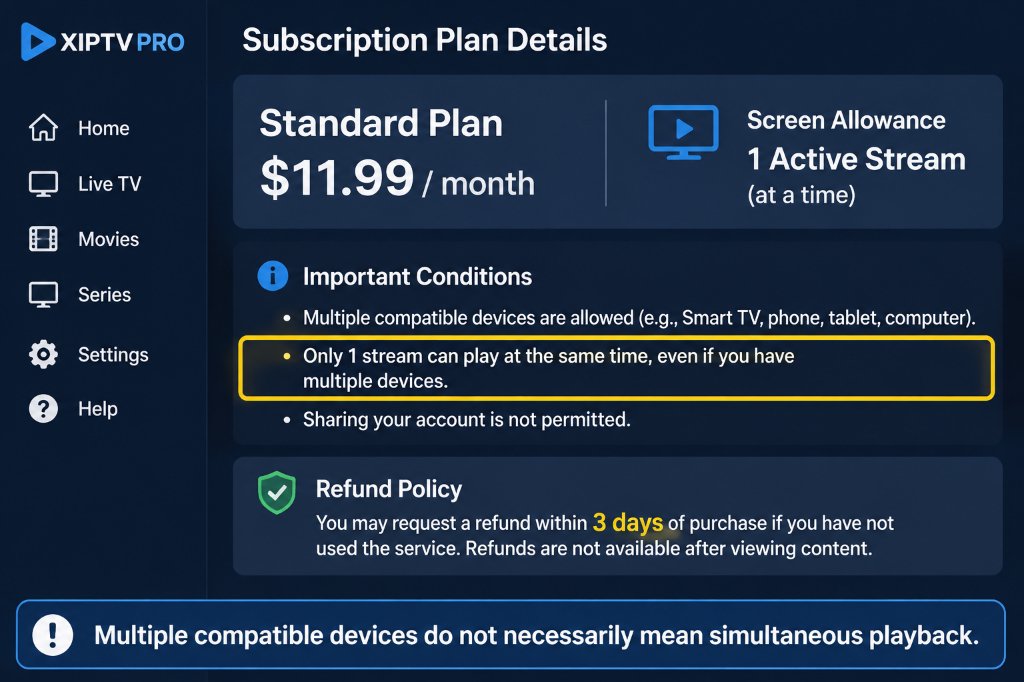
The standard XIPTV PRO plans also list one active connection. Being able to configure a television, tablet, and phone does not mean all three can play different streams simultaneously. If your household needs more screens, request the upgrade price first.
A lower upfront commitment may be useful while you assess fit. The one-month pass costs more per month than the annual option but commits less money initially. An annual payment makes more sense after you have checked the service, app, viewing allowance, and written refund terms.
Calculate your real annual saving
Compare your complete spending before and after the change. If you already pay for internet and will keep it, include it on both sides. If removing television changes the internet price, include that difference too.
Use this calculation:
Annual saving = current annual household TV and internet spending minus replacement annual TV and internet spending minus one-time switching costs.
Include other entertainment subscriptions on both sides when relevant. Anything unchanged cancels out of the calculation. Anything you add, lose, or replace changes the result.
A household example with transparent assumptions
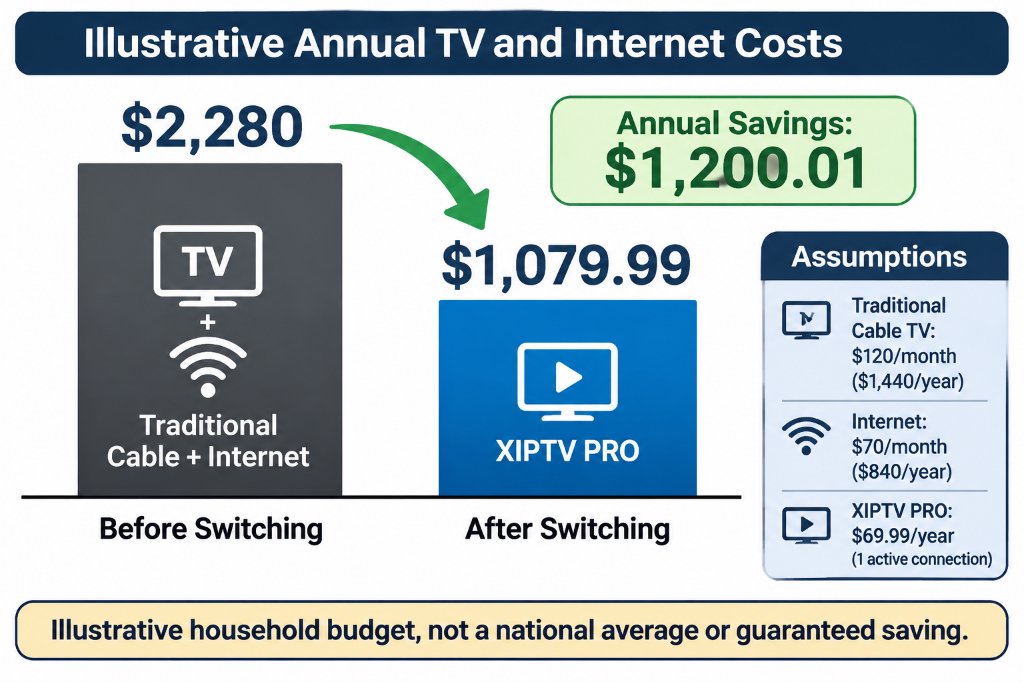
Suppose your TV service, including its recurring equipment and programming charges, costs $120 a month. Internet costs another $70. You receive an $80 internet-only quote, choose the advertised $69.99 annual pass, and budget $50 for a compatible streaming player.
These are illustrative household inputs, not national averages or quotes from a cable provider. The example assumes one active stream is enough, prices remain unchanged, and no additional subscriptions are required. Add any taxes, app charges, connection upgrades, or cancellation costs that apply to your own case.
Notice what changes the result. Removing a $120 TV charge does not save the full $1,440 a year: the replacement pass, higher internet bill, and new player reduce the saving.
If you already own a compatible device, the example’s first-year saving rises by $50. If you add a separate $20 monthly subscription, it falls by $240, to $960.01. This is why channel requirements belong in the budget before you cancel anything.
You can also test a more modest bill. With a $60 monthly TV cost and the same other assumptions, the first-year saving would be $480.01. A headline promising every household the same annual saving would miss that difference.
Compare promotions over the whole period
If a price changes halfway through the year, calculate the months separately. An illustrative offer at $50 for six months and $80 for six months costs $780 for the year, before other charges. Multiplying the introductory $50 by 12 would understate it by $180.
For an annual subscription, also note when you will decide whether to buy another pass. The effective monthly figure is useful for comparison, but it does not turn an upfront payment into monthly billing.
Costs that are easy to overlook
The extra costs worth checking are the ones specific to your household: lost bundle benefits, player fees, additional screens, and programming you would purchase separately.
Internet and included subscriptions
Ask whether your new internet quote includes the modem or router, whether the price changes after a promotion, and whether your plan has a data allowance. You do not need to assume every connection has extra charges; you need the terms for yours.
Also list any streaming services included with your current TV package. Count their replacement cost only if you would actually pay for them after leaving. Assigning full retail value to apps you never use can make the existing bundle look more valuable than it is to you.
Hardware and player apps
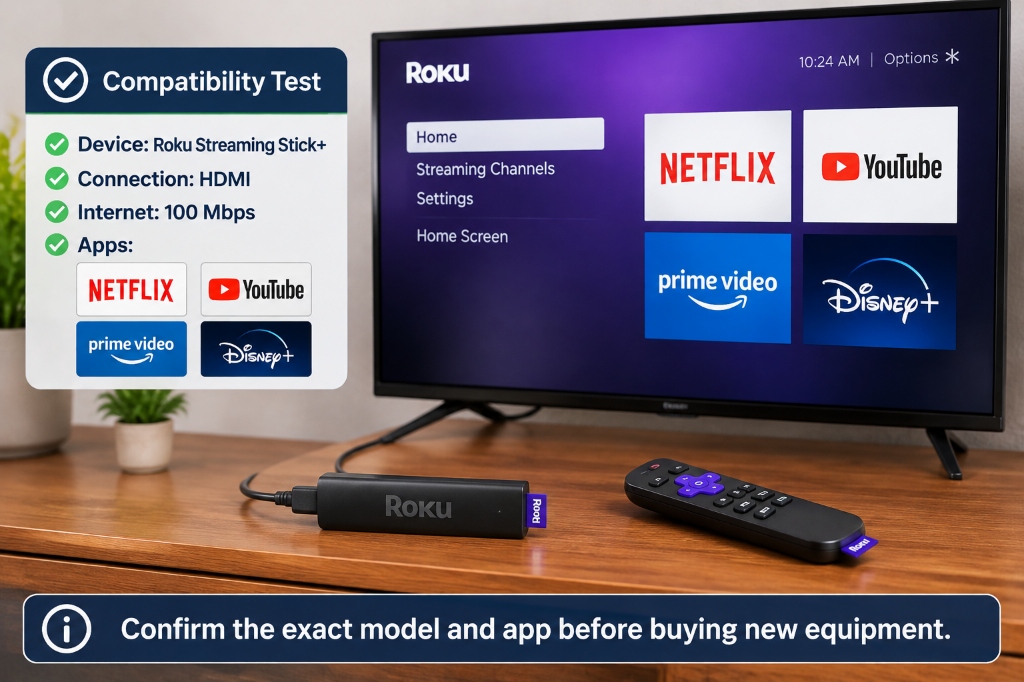
Check your exact television model and operating system against the provider’s requirements. If an app works on your current device, new hardware may be unnecessary. If it does not, budget for the device you intend to buy rather than assuming equipment is free.
Ask whether your chosen player has a separate license or paid feature tier. A TV subscription, a player app, and a physical streaming device are separate items even when they work together. XIPTV PRO’s device and app overview is a starting point for checking the combination you plan to use.
Additional screens and optional viewing
A family watching in three rooms has different requirements from one person watching on one television. Obtain a written multi-connection quote and include it in the annual total. Check whether any recording or replay features meet your needs as well.
Keep separate subscriptions visible in the budget. Paying for several apps can still be worthwhile, but the combined amount is what matters. Review services you rarely open before adding another monthly charge.
Refunds and cancellation terms
XIPTV PRO advertises no automatic recurring billing. Its FAQ also describes a seven-day refund situation involving technical incompatibility that support cannot resolve. Read that wording rather than assuming an annual purchase is refundable whenever you stop watching.
For your current provider, ask about cancellation timing, equipment returns, and any outstanding obligations. The amount may be zero. Get the answer for your own agreement and keep confirmation of returned equipment.
Compare the viewing experience as well as the price
The best-value service is one that delivers the programming and usability you need at a sustainable cost. A channel count or a 4K label cannot establish that on its own.
Channels and sports
Check the exact local stations, regional sports coverage, and events you want to watch. A network name alone does not establish that every game or pay-per-view event is included. Confirm location restrictions, the plan required, and any additional purchase.
For any provider, seek clear information about its authorization to supply the advertised channels and events in your location. Channel logos, a working playlist, or a low price do not establish distribution rights. This matters when deciding whether the service is a dependable replacement for your current package.
Picture quality and connection stability
Resolution, frame rate, source quality, and compression all affect what you see. A 4K-capable device does not turn every channel into a native 4K broadcast, and a high broadband speed alone does not guarantee uninterrupted playback.
XIPTV PRO’s FAQ recommends at least 30 Mbps for its 4K streams. As a separate reference, Netflix recommends 15 Mbps or higher for its own 4K viewing. Those are service-specific recommendations, not interchangeable guarantees for every stream.
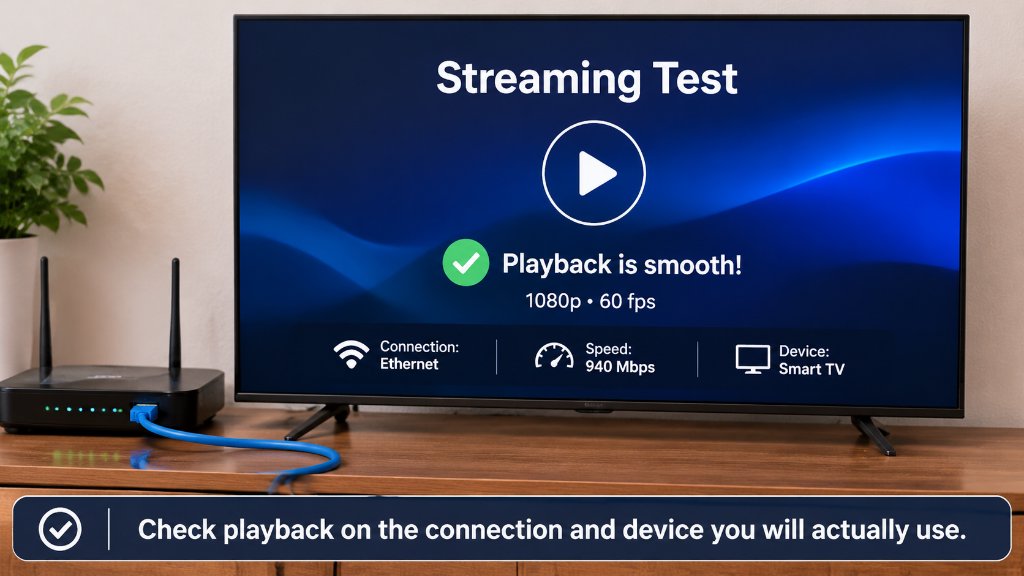
Test where the television sits and at the times you normally watch. Leave room for other household activity. If playback struggles, compare Wi-Fi with an Ethernet connection where practical before buying a faster internet plan.
Everyday usability
Try the guide, subtitles, channel search, remote, and any replay features you depend on. Ask another household member to find a familiar program without your help. A setup that requires constant troubleshooting may not be worth a small saving.
Traditional TV can remain a reasonable choice if your existing package meets these needs and its total cost is competitive. Internet TV can be a better fit if it covers your viewing, works well on your setup, and lowers your complete bill.
Choose a setup and make the switch carefully
Start with the lowest-cost combination that meets your actual requirements, then test it before canceling the service you depend on.
1 Review your current spending
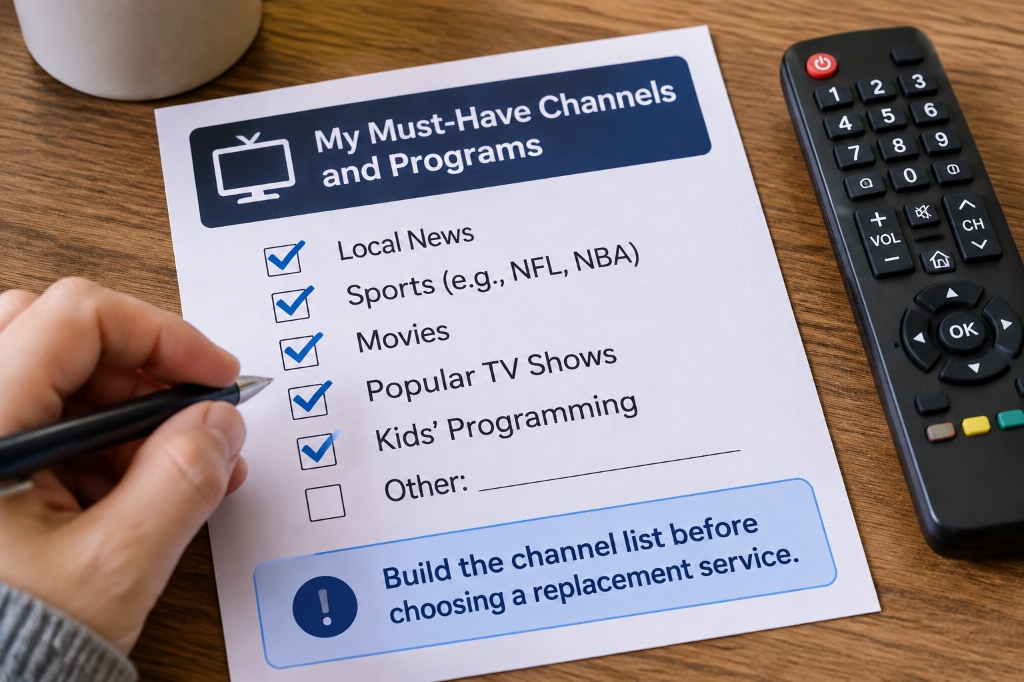
Collect your recent TV and internet bills and list any separately billed entertainment subscriptions. Note promotion end dates, included apps, rented equipment, and services you no longer use.
2 Confirm the replacement price and lineup
Get the internet-only quote, identify the subscription you need, and confirm your must-have programming. Add app costs, simultaneous connections, hardware, and any overlap period while you test both services.
3 Try the exact device and app combination
Use your existing equipment if it is compatible. Follow the relevant TiviMate and FireStick setup guide if that is your chosen setup, and confirm the current app instructions before installing. A successful setup on one device does not prove that another model will work identically.
4 Check the terms before choosing a longer pass
Read the billing and refund FAQ, keep a copy of the applicable terms, and ask support to clarify anything that affects your purchase. If the test meets your needs, compare the annual payment with the shorter option using your own budget.
5 Cancel and check the next bills
Confirm the cancellation date and equipment-return procedure with your old provider. Check the next internet and payment statements against your estimate. If the totals differ, resolve the discrepancy before treating the projected saving as money you have actually saved.
Frequently asked questions
Is IPTV always cheaper than cable TV?
No. A lower subscription price can be offset by a higher internet bill, extra sports subscriptions, additional connections, or new equipment. Compare your full annual household cost and confirm that the replacement includes the programming you actually watch.
How much can I save by switching from cable to IPTV?
Your saving is the difference between your current annual spending and the complete replacement cost. In the illustrative example above, a $120 monthly TV cost is replaced with a $69.99 annual pass, internet rises by $10 a month, and a $50 device is purchased. That produces a first-year saving of $1,200.01 before any additional costs.
Is the XIPTV PRO annual pass billed at $5.83 a month?
No. The advertised annual payment is $69.99 upfront. Dividing that by 12 gives an effective monthly cost of about $5.83, while the separately advertised one-month pass costs $11.99.
Do I need faster internet to use IPTV?
Not automatically. Start with the service requirements and test your existing connection on the intended device. XIPTV PRO recommends at least 30 Mbps for its 4K streams, while other services have different requirements; leave capacity for other people and devices using your connection.
Can one IPTV subscription work on several TVs at once?
Only if the plan allows enough simultaneous connections. XIPTV PRO lists one active stream on its standard plans, even though you can configure compatible devices around your home. Get the price of any multi-connection upgrade before calculating your household total.
Does no auto-renewal mean I can get a refund whenever I cancel?
No. No auto-renewal concerns future charges, while refunds depend on the applicable policy. XIPTV PRO advertises a seven-day guarantee, but its FAQ describes unresolved technical incompatibility as the refund situation. Read the current written terms before paying, especially for an annual pass.
Which option makes sense for your household
IPTV is worth considering when it covers your essential viewing, works reliably on your devices, and reduces your full annual cost. Cable can still be competitive when its bundle, included apps, or familiar setup provides value you would otherwise pay to replace.
Use your bills and the calculation above to make the decision. If XIPTV PRO fits your requirements, review the one-year pass details after confirming the connection allowance and purchase terms. Choose the payment period you are comfortable with, and let the result on your own screen and budget guide the next step.
Watch Live Sports on IPTV Without Freezing (2026 Anti-Freeze Guide)
Table of Contents
The Ultimate Goal: Zero Buffering on Game Day
Every sports fan wants to know how to watch live sports on iptv without freezing when Sunday kickoff arrives or when the UFC Main Card begins. Nothing ruins the excitement of a championship matchup faster than an endless buffering wheel spinning right as a touchdown pass is thrown.
Live sporting events are the ultimate test of any streaming service. Unlike pre-recorded movies that can be pre-cached, live sports require continuous, real-time packet transmission at 60 frames per second. If you want to watch live sports on iptv without freezing, understanding how data routing works is the key to enjoying flawless coverage.
In this guide, we break down why traditional streams stutter during peak viewing hours and explain how modern Anti-Freeze 10.0 edge CDN architecture ensures smooth, uninterrupted 4K sports streaming.
How to Watch Live Sports on IPTV Without Freezing Using Anti-Freeze 10.0
The primary reason budget streaming services fail during NFL Sundays is server congestion. When hundreds of thousands of fans connect to a single overseas server, bandwidth limits are exceeded, resulting in dropped frames. Furthermore, major US internet providers frequently throttle video traffic when they detect high-volume streaming spikes.
To successfully watch live sports on iptv without freezing, XIPTV PRO developed its revolutionary Anti-Freeze 10.0 protocol. This enterprise routing technology operates on three key principles:
- 5 US Tier-4 Data Centers: Dedicated streaming infrastructure in New York, Chicago, Dallas, Miami, and Los Angeles ensures sub-15ms server ping times across North America.
- 48 Edge CDN Nodes: Video data is cached at local network edges nationwide, meaning your stream travels only a few miles instead of across oceans.
- Dynamic Packet Re-Routing: If a local internet provider throttles a specific port, Anti-Freeze 10.0 reroutes the stream in real-time through an encrypted tunnel without interrupting playback.
Comprehensive Live Sports Coverage Available
When you have the right setup to watch live sports on iptv without freezing, you unlock unrestricted access to every major athletic event worldwide:
- NFL Sunday Ticket & RedZone: Catch every out-of-market touchdown and commercial-free Sunday action in native 60FPS. Review upcoming games on the Official NFL Schedule and Broadcast Info.
- NBA League Pass: Stream every regular-season and playoff matchup with both home and away broadcast team audio feeds.
- UFC Pay-Per-View: Watch early prelims, televised bouts, and full main event championship cards included with your pass.
- MLB, NHL & Motorsports: Extra Innings, Center Ice, Formula 1 in 4K, and NASCAR Cup Series.
- International Soccer: Premier League, UEFA Champions League, La Liga, Serie A, and MLS Season Pass.
Pro Tips to Optimize Your Home Network for Sports
To ensure you consistently watch live sports on iptv without freezing on your home hardware, follow these three practical recommendations:
- Connect via Ethernet: Wi-Fi signals can suffer from interference from household appliances. Using an Ethernet adapter for your streaming device eliminates local packet drops.
- Select 5GHz Wi-Fi if Wireless: If Ethernet is unavailable, connect your streaming device to your router’s 5GHz frequency band rather than the congested 2.4GHz band.
- Adjust Player Buffer Settings: In your IPTV media player, set the buffer size to 5–10 seconds. This small cushion absorbs sudden network drops without noticeable live delay.
Pairing your service with one of the best IPTV apps for Smart TV guarantees optimal hardware decoding for high-bitrate video feeds.
Conclusion
You no longer have to settle for choppy video or buffering wheels during championship moments. Learn how to watch live sports on iptv without freezing by choosing XIPTV PRO subscription plans. Enjoy 25,000+ live channels with guaranteed 99.9% uptime backed by our 7-day money-back guarantee.