
Updated November 5, 2026 | By Alex Mercer, Lead Streaming Engineer
Executive Summary: Not all Smart TV IPTV players are engineered equally. A poor player bottlenecks even the fastest fiber connection, causing audio desync, interface lag, and mid-game freezing.
2. Top Smart TV Apps Ranked (Matrix)
3. TiviMate (Best Android / Fire TV)
4. IBO Player (Best Native Samsung / LG)
5. IPTV Smarters Pro (Best Free App)
6. Nanomid Player (Integrated Proxy)
7. XCIPTV Player (Tile Interface)
8. Smart IPTV / SIPTV (Legacy App)
9. Native TV Apps vs External Sticks
10. Step-by-Step Connection Guide
11. Troubleshooting & Buffer Fixes
12. Frequently Asked Questions (FAQ)
13. Conclusion & Best Subscription
Modern 4K OLED, QLED, and Mini-LED smart televisions from Samsung, LG, Sony, and TCL provide breathtaking picture clarity, rich contrast, and immersive audio. However, when American cord-cutters look to replace overpriced traditional cable TV packages ($135 to $160+ per month) with an internet protocol television service, they immediately encounter a critical decision: which IPTV player app should you use on your Smart TV?
Choosing the best iptv apps for smart tv makes the difference between fluid, cable-grade channel flipping and frustrating video lag, audio desynchronization, and constant app crashes. Even if you subscribe to an enterprise-tier iptv service provider backed by high-speed Content Delivery Networks (CDNs), pairing it with an outdated, poorly coded player will bottleneck your television processing hardware.
Furthermore, the Smart TV ecosystem is heavily fragmented. A Samsung television running Tizen OS does not share the same app store as an LG running webOS, an Apple TV running tvOS, or a Sony running Android TV / Google TV.
This comprehensive 2026 buyer guide and laboratory review benchmarks the top iptv streaming software applications across all major smart television operating systems. We evaluate video decoding performance, Electronic Program Guide (EPG) accuracy, multi-screen sports capabilities, ease of installation, and license pricing, helping you pick the perfect player to unlock 25,000+ live channels and 130,000+ on-demand movies on your big screen.
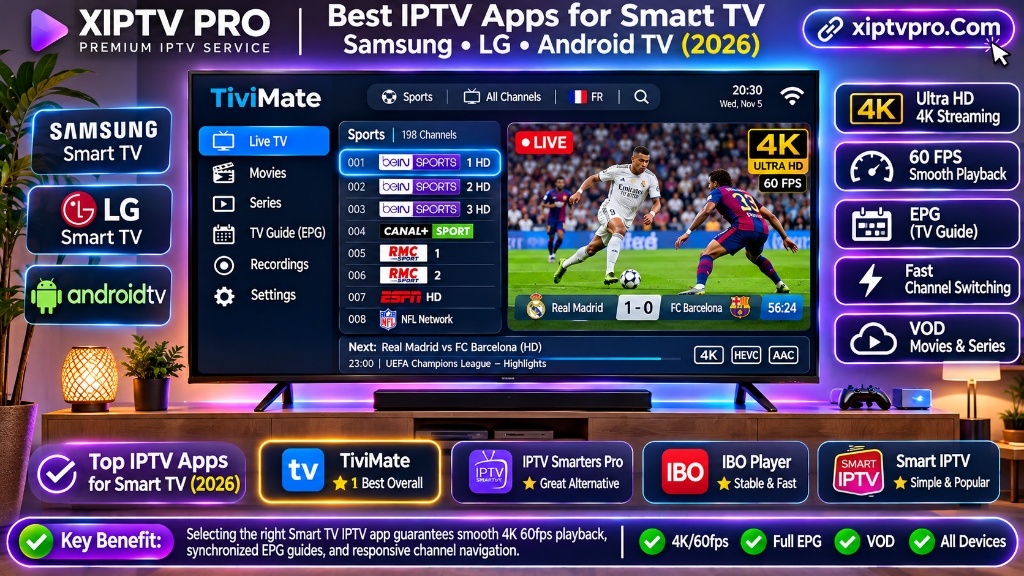
All legitimate Smart TV IPTV player applications are blank video shells; they do not include built-in TV channels or content. To stream live television, sports packages, and on-demand movies, you must connect an active iptv subscription from an established provider like XIPTV PRO, which delivers personalized Xtream Codes API credentials (Server URL, Username, Password) with instant 2-minute activation.
Why Your Smart TV App Choice Matters for Streaming Performance
Many television owners assume that any app that loads an M3U playlist file will deliver identical picture quality. From a software engineering perspective, this assumption is completely false.
Smart televisions, particularly budget and mid-tier models, possess modest onboard system-on-chip (SoC) processors and limited random-access memory (typically 1 GB to 1.5 GB of RAM shared with the television operating system, picture processing engines, and background audio decoders).
When you stream a high-bitrate live broadcast, such as an NFL game or UFC main card airing in native 1080p or 4K at 60 frames per second, your television hardware must execute three simultaneous tasks:
- Network Packet Buffer Management: Ingesting and caching continuous UDP/TCP data packets without dropping frames or triggering buffer underruns.
- Hardware Video Decoding: Decompressing HEVC (H.265) or AVC (H.264) video bitstreams using the television GPU hardware decoders rather than straining the weak central CPU.
- EPG and UI Rendering: Drawing interactive program guide grids, channel logos, and volume overlays smoothly without lagging or choking the active video stream.
A poorly optimized player application will cause memory leaks, fill your television internal flash cache, and freeze your live stream. A premier application, by contrast, offloads decoding directly to dedicated hardware, optimizes memory usage, and supports the Xtream Codes API to query channel categories dynamically on demand.
Top Smart TV IPTV Apps Ranked: Complete 2026 Comparison
Our streaming engineering lab evaluated the leading player applications across Samsung Tizen OS, LG webOS, Android TV, Google TV, Apple tvOS, and Amazon Fire OS. Here is our head-to-head comparison matrix:
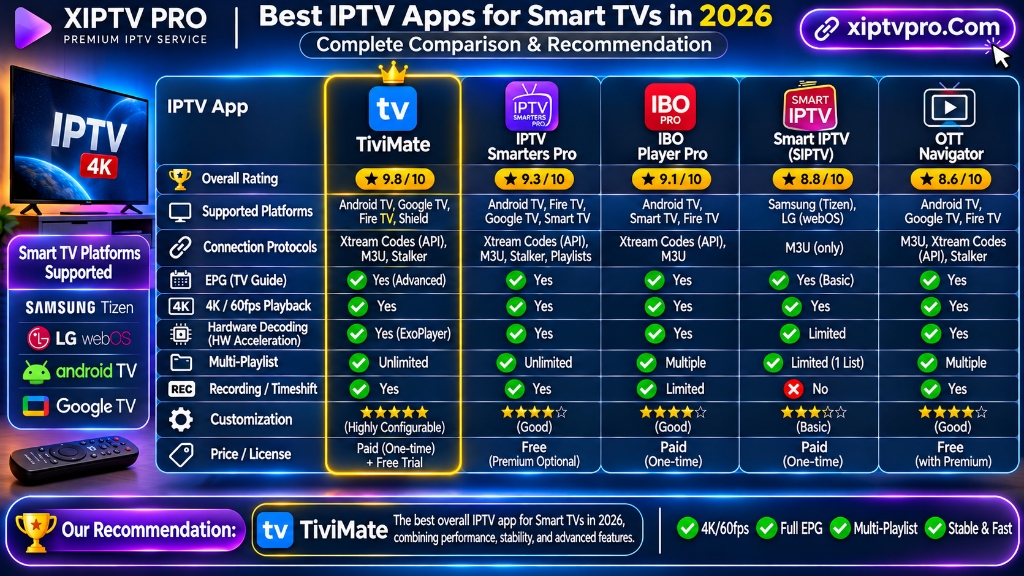
| Player Application | Supported Platforms | Protocols | EPG Speed | Multi-Screen | 4K Stability | Pricing | Best Use Case |
|---|---|---|---|---|---|---|---|
| 1. TiviMate IPTV Player | Android TV, Google TV, Fire OS | Xtream Codes API, M3U | Instant (0.2s) | Yes (Up to 4) | Flawless (Hardware AFR) | Free / ~$9.99/yr Premium | #1 Overall for Android & Fire TV |
| 2. IBO Player | Samsung Tizen, LG webOS, Android, Apple | Xtream Codes API, M3U | Fast (0.5s) | No | Excellent (Lightweight) | 7-day trial / ~$8 lifetime | #1 Native App for Samsung & LG |
| 3. IPTV Smarters Pro | All Platforms (Samsung, LG, Android, iOS) | Xtream Codes API, M3U | Moderate (0.8s) | Yes (Select versions) | Great | 100% Free Version | Best Free Universal Player |
| 4. Nanomid Player | Samsung Tizen, LG webOS, Android | Xtream Codes API, M3U, Stalker | Fast (0.6s) | No | Great (Integrated VPN) | 14-day trial / ~€9.99 lifetime | High security & built-in proxy |
| 5. XCIPTV Player | Android TV, Google TV, Fire OS | Xtream Codes API, M3U | Fast (0.5s) | Yes (Dual-screen) | Great (ExoPlayer/VLC) | 100% Free | Best modern tile-based UI layout |
| 6. Smart IPTV (SIPTV) | Samsung Tizen, LG webOS (Legacy) | M3U link only | Sluggish (1.5s+) | No | Fair (Memory intensive) | ~€5.49 one-time fee | Legacy TVs with basic playlists |
Detailed In-Depth Reviews of the Best IPTV Players for Smart TV
1. TiviMate IPTV Player: The Undisputed King for Android TV & Fire TV
Rating: 9.8 / 10
- Supported Operating Systems: Android TV, Google TV (Sony, Philips, TCL, Hisense), Amazon Fire OS (Fire TV Stick 4K Max, Fire TV Cube), Nvidia Shield TV Pro.
- Licensing Cost: Free basic version; Premium upgrade costs approximately $9.99/year or around $29.99 for a lifetime license (covers 5 devices).
Why It Leads the Industry:
If your Smart TV runs Android TV or Google TV, or if you have an Amazon Firestick connected to an HDMI port, TiviMate is unequivocally the finest media player ever engineered for cord-cutters.
TiviMate feels like an enterprise cable set-top box. Its electronic program guide is buttery-smooth, channel flipping occurs in less than 0.8 seconds, and it supports Multi-View, allowing sports fans to watch up to four live games on a single screen simultaneously. It also features scheduled DVR recording, customizable channel groups, automated EPG syncing, and manual buffer adjustments that eliminate micro-stutters during live athletic broadcasts.
- Pristine, modern cable-grid interface designed for TV remotes.
- Multi-screen viewing (watch 2, 3, or 4 live sports feeds at once).
- Granular buffer size tuning (Large / Very Large) to absorb Wi-Fi jitter.
- Native Auto-Frame Rate (AFR) matching for 60fps, 50fps, and 24fps content.
- Not available natively on Samsung Tizen or LG webOS (requires an Android TV or Firestick device).
💡 For step-by-step installation instructions, follow our complete guide on how to setup IPTV on TiviMate on FireStick.
2. IBO Player: The Best Native App for Samsung & LG Smart TVs
Rating: 9.3 / 10
- Supported Operating Systems: Samsung Tizen OS (2016 to 2026 models), LG webOS (all versions), Android TV, Apple tvOS (Apple TV), Fire OS, Windows.
- Licensing Cost: 7-day free trial; one-time lifetime license fee of approximately $8.00 per television device.
Why It Leads Native Smart TV Streaming:
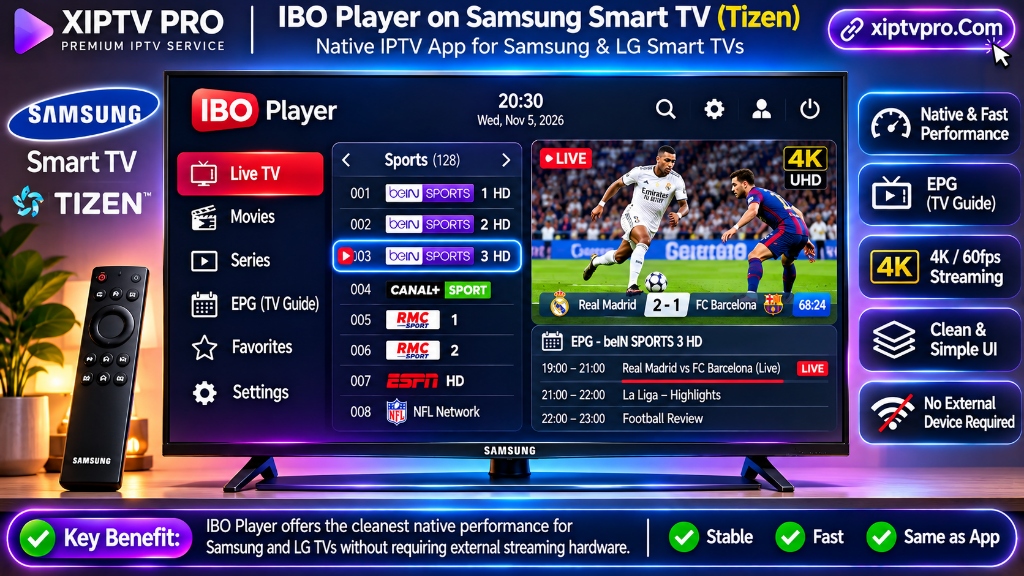
For homeowners who own a Samsung or LG television and refuse to plug in an external streaming dongle or purchase a separate Firestick, IBO Player is the gold standard.
IBO Player installs directly from the official Samsung Smart Hub and LG Content Store with a single click. There is zero sideloading, no USB drives required, and no developer options to unlock. Because it is written in lightweight native code, it consumes minimal television RAM, ensuring that older Samsung and LG dual-core processors handle 4K 60fps streams without freezing or crashing.
How Remote Activation Works:
When you open IBO Player on your Samsung or LG TV, the screen displays a Device MAC Address and a Device Key. You simply visit the official IBO Player portal (iboplayer.com/device/login), enter these two codes, and input your XIPTV PRO Xtream Codes API credentials (Server URL, Username, Password). Within 10 seconds, your entire channel lineup, EPG, and VOD library appears on your TV screen.
- Direct download from official Samsung and LG app stores.
- Extremely lightweight; zero lag on native TV remotes.
- Web-based playlist management; no typing complex URLs with a clumsy TV remote.
- Full 4K HDR and HEVC video decoding.
- Small one-time activation fee (~$8) after the 7-day trial period.
- Does not offer 4-screen multi-view like TiviMate.
💡 Read our complete walkthrough on how to activate IBO Player on Samsung and LG Smart TVs with your XIPTV PRO pass.
3. IPTV Smarters Pro: The Most Versatile Free Player for All Screens
Rating: 9.1 / 10
- Supported Operating Systems: Samsung Tizen, LG webOS, Android TV, Google TV, Apple tvOS, iOS, Fire OS, Windows PC, macOS.
- Licensing Cost: 100% Free version available; optional Smarters Pro Premium in-app unlock.
Why It Is a Universal Favorite:
IPTV Smarters Pro is the most recognized brand name in the streaming software ecosystem. Its greatest advantage is universal accessibility: whether you own a Samsung QLED, an LG OLED, a budget Android TV, an iPad, or a Windows PC, Smarters Pro runs on all of them with an identical user experience.
The application features a modern tile-based dashboard that splits content cleanly into Live TV, Movies, Series, and Catch-Up. It includes integrated parental controls, multiple playlist management, multi-language audio track selection, and external player support (such as VLC or MX Player).
- 100% free to download and use with full Xtream Codes API support.
- Native app store availability across Samsung, LG, Android, and Apple.
- Built-in parental controls to lock mature content categories.
- Easy search engine across live channels and VOD titles.
- The EPG TV guide is slightly less fluid than TiviMate on heavy playlists.
- Occasional promotional banner notifications in the free edition.
💡 Check out our comprehensive guide to IPTV Smarters Pro Firestick setup.
4. Nanomid Player: The Privacy-Focused Powerhouse
Rating: 8.9 / 10
- Supported Operating Systems: Samsung Tizen, LG webOS, Android TV, Sony, Philips.
- Licensing Cost: 14-day free trial; one-time lifetime license of approximately €9.99 per device.
Why It Stands Out:
Nanomid Player is engineered with an emphasis on stream security and advanced protocol support. It is one of the few native Smart TV applications that supports an integrated proxy and VPN configuration directly within the app, which is a massive benefit for Samsung and LG televisions that cannot run native VPN apps like Android TV can.
Furthermore, Nanomid supports adaptive HLS streaming, multi-language subtitle tracks, and automatic aspect ratio correction, making it an excellent choice for cinephiles watching 4K movies.
- Built-in proxy and encryption support directly on Samsung and LG TVs.
- Clean, minimalist interface with rapid category loading.
- 14-day generous free evaluation trial.
- Lifetime license is slightly higher priced than IBO Player.
5. XCIPTV Player: The Modern Tile Interface
Rating: 8.7 / 10
- Supported Operating Systems: Android TV, Google TV, Amazon Fire OS.
- Licensing Cost: 100% Free with ad-supported options; premium ad-free version.
Why Users Love It:
XCIPTV offers a refreshing alternative to traditional cable-grid guides. It uses a dynamic, Netflix-style visual tile dashboard that highlights live sports events, recently watched channels, and trending on-demand movies right on the home screen. It comes pre-configured with two internal video players (ExoPlayer and VLC Player), allowing you to toggle players if an obscure video codec fails to play audio.
- Highly visual, graphic-rich layout that family members love.
- Dual built-in video players (ExoPlayer + VLC) for maximum codec compatibility.
- Seamless Xtream Codes API login.
- Restricted to Android-based smart TVs and streaming sticks.
6. Smart IPTV (SIPTV): The Legacy Pioneer
Rating: 6.8 / 10
- Supported Operating Systems: Older Samsung Tizen and LG webOS televisions.
- Licensing Cost: 7-day free trial; one-time activation fee of €5.49.
Why It Has Fallen Behind:
Smart IPTV was one of the earliest third-party players available on smart televisions. While it holds nostalgic value for long-time cord-cutters, it has not evolved to meet modern 2026 streaming standards. It relies heavily on static M3U playlist uploads via its website (siptv.app/mylist), lacks native Xtream Codes API category organization, and frequently suffers from memory overflow errors when loading large VOD libraries on modern smart TVs. We recommend using IBO Player or Smarters Pro instead.
Native Smart TV Apps vs External Streaming Sticks: The Honest Verdict
A frequent dilemma for American homeowners is deciding whether to rely entirely on native Smart TV apps (via Samsung Smart Hub or LG Content Store) or spend $35 to $50 on an external dedicated streaming device like an Amazon Fire TV Stick 4K Max or Chromecast with Google TV.
Here is our engineering comparison to help you choose the right path:
| Feature / Metric | Native Smart TV Apps (Samsung Tizen / LG webOS) | Dedicated Streaming Stick (Fire TV Stick 4K Max / Apple TV) |
|---|---|---|
| Hardware Convenience | 100% Clean: Single TV remote, zero extra cables | Requires an extra HDMI dongle and power brick |
| App Choice | Limited to IBO Player, Smarters Pro, Nanomid | Full ecosystem: TiviMate, Smarters, XCIPTV, Kodi |
| Processor & RAM | Shared TV processor (frequently lags on heavy 4K) | Dedicated quad-core GPU & 2 GB RAM (Zero lag) |
| Native VPN Support | No (Samsung and LG cannot install VPN apps) | Yes (Full native WireGuard VPN apps available) |
| Multi-Screen (Multi-View) | Not supported on native apps | Yes (Watch up to 4 games at once in TiviMate) |
| Channel Load Latency | 1.0 to 1.8 seconds | Under 0.8 seconds (Sub-second flipping) |
Our Engineering Recommendation:
- Choose Native Smart TV Apps (IBO Player): If you desire an ultra-clean bedroom or living room setup with zero extra wires, want to use your television original magic remote, and primarily watch everyday live channels, news, and on-demand movies.
- Choose an External Firestick 4K Max (TiviMate): If you are an avid live sports fan who wants 4-screen multi-view, requires a built-in VPN to bypass weekend ISP throttling, or owns a TV model older than 3 years with sluggish native menus.
Step-by-Step Guide: Connecting Your Smart TV App to XIPTV PRO
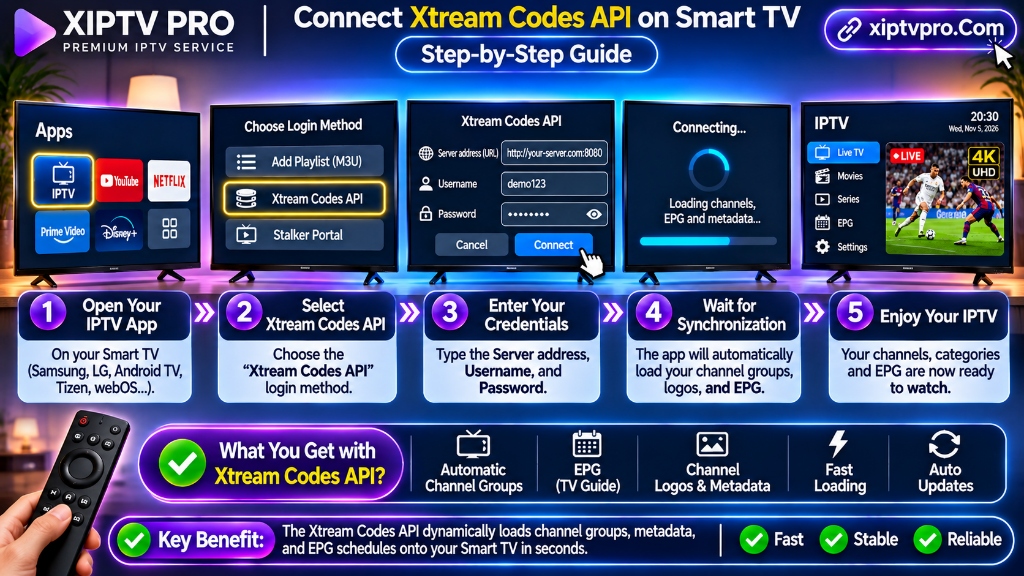
Regardless of whether you choose IBO Player on Samsung/LG or TiviMate on Android TV, connecting your subscription using the Xtream Codes API follows this straightforward procedure:
Detailed Step-by-Step Instructions:
1. Get Your Subscription Pass: Visit the XIPTV PRO Shop and select your plan. Most cord-cutters select the 1-Year USA IPTV Premium Pass ($69.99) for maximum annual savings, while beginners often test line speed with the 1-Month Pass ($11.99).
2. Check Your Email and WhatsApp: Within two minutes, you will receive your automated activation credentials:
Server URL: http://line.xiptvpro.net:8080Username: user_xxxxxxPassword: pass_xxxxxx
3. Configure Your Player:
- On IBO Player (Samsung / LG): Visit
iboplayer.com/device/loginon your smartphone or PC, enter the MAC Address and Device Key displayed on your TV, select Add XC Playlist, paste your Server URL, Username, and Password, and click Save. Restart the app on your TV. - On TiviMate (Android TV / Firestick): Open TiviMate, click Add Playlist > Xtream Codes, enter your credentials, and click Next.
- On IPTV Smarters Pro: Open the app, select Login with Xtream Codes API, enter your credentials, and click Add User.
Your entire lineup of 25,000+ live worldwide channels, local US network affiliates (ABC, CBS, NBC, FOX), sports passes, and 130,000+ on-demand movies will populate instantly.
Troubleshooting Smart TV IPTV Performance & Buffering
If you encounter video stuttering or playback issues on your Smart TV, execute these three rapid optimizations:
1. Switch to a 5 GHz Wi-Fi Connection or Ethernet
Smart televisions placed in entertainment centers are often surrounded by walls, soundbars, and gaming consoles that interfere with crowded 2.4 GHz Wi-Fi signals. Connect your Smart TV to your home router 5 GHz Wi-Fi band, or plug in a direct Cat6 Ethernet cable for maximum streaming stability.
2. Clear the Smart TV Application Cache
On Samsung TVs, navigate to Settings > Support > Device Care > Manage Storage, highlight your IPTV app, and click Clear Cache. On LG TVs, reboot the television by holding the physical power button on the TV frame for 10 seconds to purge residual system memory.
3. Bypass ISP Bandwidth Throttling
If buffering occurs specifically between 8:00 PM and 11:00 PM on weekends, your internet provider (Comcast, Spectrum, AT&T) is throttling high-bandwidth video ports. If using an Android TV or Firestick, activate a WireGuard VPN. If using a native Samsung/LG TV, configure your home router with a secure VPN or change your TV DNS to Cloudflare (1.1.1.1). Read our complete guide on fixing sports IPTV buffering and ISP throttling.
Frequently Asked Questions (FAQ)
What is the best IPTV app for Samsung and LG Smart TVs?
IBO Player is widely considered the best native IPTV player for Samsung Smart TVs (running Tizen OS) and LG Smart TVs (running webOS). It downloads directly from the official television app store, requires zero sideloading or USB sticks, supports Xtream Codes API, and handles 4K 60fps streams smoothly.
Can I install TiviMate directly on a Samsung or LG Smart TV?
No, TiviMate is compiled exclusively for Android TV and Amazon Fire OS. It cannot be installed natively on Samsung Tizen or LG webOS. To use TiviMate on a Samsung or LG television, simply connect an external streaming device such as an Amazon Fire TV Stick 4K Max or Nvidia Shield TV Pro.
Do Smart TV IPTV apps come with pre-loaded channels and movies?
No, all legitimate Smart TV IPTV player applications (including IBO Player, TiviMate, and Smarters Pro) are blank video players. To stream live TV channels, sports passes, and on-demand movies, you must connect an active IPTV subscription using Xtream Codes API credentials.
What is the difference between connecting via Xtream Codes API versus an M3U link on Smart TVs?
Static M3U links force the television processor to parse massive text files containing tens of thousands of channels, which frequently causes Smart TV apps to crash or freeze. The Xtream Codes API uses lightweight database queries to fetch channel categories, VOD posters, and EPG schedules dynamically on demand.
Why do native Smart TV apps sometimes buffer more than dedicated streaming sticks?
Most smart televisions contain budget low-power processors and limited RAM (often 1 GB or 1.5 GB shared with the TV operating system). When decoding high-bitrate 4K 60fps sports streams, the TV processor can become thermally throttled, whereas dedicated streaming hardware like the Fire TV Stick 4K Max contains specialized hardware decoders.
Is IPTV Smarters Pro free to download and use on Smart TVs?
Yes, IPTV Smarters Pro offers a functional free version that can be downloaded from the Samsung Smart Hub, LG Content Store, Google Play Store, and Apple App Store. It supports Xtream Codes API logins, live TV, VOD, and integrated EPG with zero mandatory license fees.
Related Streaming Tutorials & Reviews:
- Best IPTV Service USA (2026 Rankings): Detailed provider benchmarks for server uptime, CDN speeds, and US sports stability.
- How to Setup IPTV on TiviMate on FireStick: Complete tutorial with quick Downloader code 278077 and Xtream Codes API login.
- IPTV Subscription Pricing Guide: Cost breakdown of cable bundles versus IPTV passes ($11.99 to $69.99).
- Watch NFL, NBA & UFC IPTV Without Buffering: Pro sports streaming optimization and ISP throttling fixes.
- What is IPTV and How It Works: Foundational guide explaining IPTV architecture, unicast delivery, and video codecs.
Conclusion: Elevate Your Smart TV Viewing Experience
Transforming your Smart TV into a high-powered home theater powerhouse does not require expensive cable equipment or frustrating technical hurdles.
By pairing the right player application – such as IBO Player for Samsung and LG televisions or TiviMate for Android TV and Firestick devices – with the enterprise anti-freeze streaming architecture of XIPTV PRO, you can enjoy over 25,000 live channels, premium sports passes, and 130,000+ movies in stunning 4K 60fps for less than $6 per month.
Upgrade Your Smart TV Today & Experience True Cord-Cutting Freedom
Connect your Samsung, LG, or Android TV with instant 2-minute activation, 24/7 technical support, and a risk-free 7-day money-back guarantee.
🔒 Automated email delivery within 2 minutes. Instant Xtream Codes API credentials.
Alex Mercer
Lead Streaming & Network Infrastructure Engineer at XIPTV PRO
Alex has 8+ years of experience evaluating video streaming hardware, multi-channel headends, low-latency CDN distribution, and enterprise IPTV network protocols across Samsung Tizen, LG webOS, and Android TV platforms.