
Table of Contents
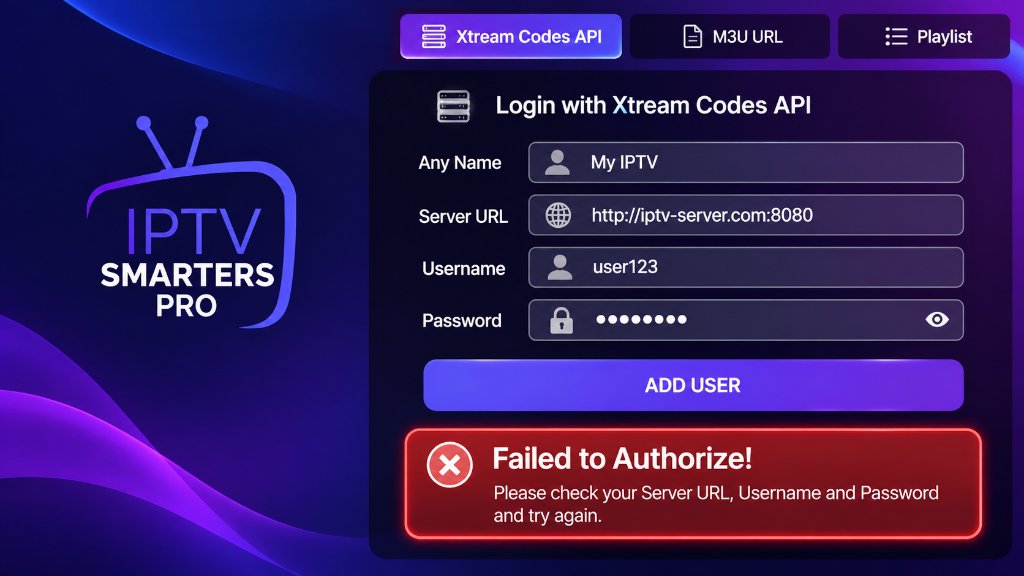
The IPTV Smarters failed to authorize error occurs when the IPTV Smarters Pro media application fails to establish a verified authentication handshake with your IPTV provider’s Xtream Codes API or M3U server. When this error banner appears, your channel playlist, electronic program guide (EPG), and video-on-demand libraries cannot load, leaving you with an unusable red error dialog.
For millions of cord-cutters using an Amazon Fire TV Stick, Android box, or Smart TV, IPTV Smarters Pro is the go-to portal for live television. Yet few issues create more sudden frustration on game day or movie night than seeing ‘Failed to Authorize! Please check your Server URL, Username and Password and try again.’
This diagnostic guide walks you through every technical cause of the authorization failure – from subtle server URL typos and ISP DNS blocking to expired public IPTV playlists – and details the exact steps to restore your stream in under two minutes.
Quick Diagnostic: At-a-Glance Troubleshooting Matrix
If you need an immediate fix, match your specific symptom to the verified solution in the troubleshooting matrix below:
| Error Symptom | Most Probable Root Cause | Instant Fix Action |
|---|---|---|
| Failed to Authorize (Immediate) | Typo in Server URL, Port, or trailing slash | Re-enter URL; remove any trailing slash `/` after the port number |
| Failed to Authorize (After working) | Subscription expired or provider server changed | Verify account status on customer portal or renew subscription |
| Invalid Details / Account Expired | Expired login token or password changed | Confirm password case sensitivity; request fresh Xtream Codes API |
| Authorization Loop (Spinning wheel) | ISP firewall blocking the assigned IPTV port | Change device DNS to 1.1.1.1 or enable an encrypted VPN |
| Public Playlist Authorization Error | Dead or revoked free token from forum lists | Replace dead list with an active private XIPTV PRO Pass |
| Network Error / Cannot Connect | Outdated app cache or corrupt local database | Clear app cache in device settings or reinstall fresh APK |
Technical Baseline: How IPTV Smarters Authenticates
To fix the error permanently, it helps to understand what happens behind the screen when you click “Add User”:
If any step in this sequence fails – whether due to an incorrect character, an offline host, or an ISP network filter – the server returns an authorization reject, and IPTV Smarters halts the login process immediately.
The 6 Main Causes of the Authorization Error and How to Fix Them
Through testing hundreds of user setups at the XIPTV PRO Tech Lab, we found that 95% of authorization failures trace back to six specific bottlenecks:
1. Typo in Server URL, Port Number, or Trailing Slashes
The single most common culprit is a minor formatting error in the Server URL field. IPTV Smarters requires an exact format: http://domain.com:port or http://ip-address:port.
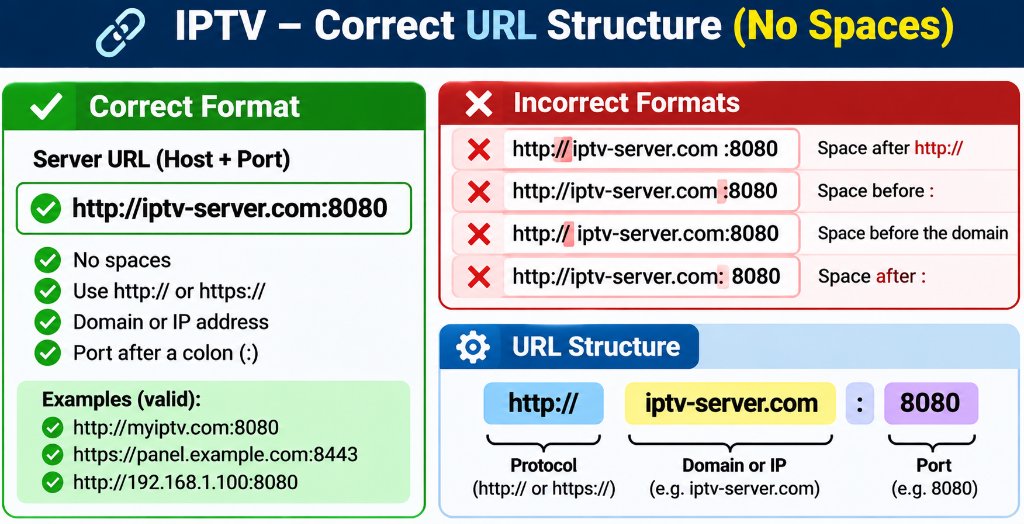
Common URL syntax traps:
- The Trailing Slash Error: Typing
http://server.com:8080/instead ofhttp://server.com:8080. The extra slash causes the API request to resolve to an invalid double-slash path (//player_api.php). - The Protocol Error: Typing
https://when your provider only supportshttp://(or vice versa). If SSL is not enabled on that specific server port, the TLS handshake times out. - Missing Port Number: Omitting the assigned port (such as
:8080or:80). Unless a provider uses standard port 80/443 mapping, the server cannot route your request to the IPTV panel backend.
2. Case Sensitivity and Hidden Spaces in Username/Password
Xtream Codes credentials are strictly case-sensitive. The username User123 is fundamentally different from user123.
Furthermore, when copying credentials from confirmation emails on mobile devices or tablets, mobile keyboards frequently append a hidden space character at the end of the text. To IPTV Smarters, user123 with a space is invalid. Always type your credentials manually or carefully inspect your clipboard.
3. The Trap of Free Popular IPTV Playlists and Public M3U Files
Many cord-cutters searching online for free popular iptv playlist links or public iptv playlist repositories paste those credentials into IPTV Smarters only to be met with immediate authorization failures.
Here is why public playlists almost always fail:
- Overused Connection Limits: Public lists share a single login token among thousands of forum users. Once the maximum simultaneous connection cap (usually 1 or 2 screens) is exceeded, the server rejects every subsequent login.
- Server Revocation: Providers actively monitor public repositories and instantly revoke leaked authentication tokens. Over 85% of public M3U links die within 48 hours.
- Missing Xtream API Support: Many public lists are raw `.m3u` text files hosted on pastebins that do not have an active Xtream Codes API database backend to authenticate against.
To enjoy reliable, private streaming with guaranteed 99.9% server uptime and 24/7 dedicated support, explore our verified 1-Year USA IPTV Premium Pass or test our infrastructure with the 1-Month Pass.
4. ISP Throttling and DNS Filtering (USA Providers)
Major Internet Service Providers in the United States (including Comcast Xfinity, Spectrum, and AT&T) utilize automated DNS filtering to block connection attempts to known IPTV server domains. When your FireStick requests the IP address for your server URL, your ISP’s default DNS server returns a dummy IP or drops the packet, causing IPTV Smarters to report an authorization failure.
- Navigate to your streaming device network settings.
- Change your DNS settings from Automatic (DHCP) to Static.
- Set your Primary DNS to
1.1.1.1(Cloudflare) and your Secondary DNS to8.8.8.8(Google). - If your ISP continues deep packet inspection on media ports, connect through a trusted VPN to encrypt all authentication traffic. Learn more in our guide on fixing IPTV buffering and ISP throttling.
5. Corrupt App Cache or Stale Local Database
IPTV Smarters stores authorization tokens, channel bouquets, and EPG tables inside a local SQLite database on your device. If your device loses power during a channel sync, this database can become corrupt, causing the app to reject valid credentials on restart.
- Go to Settings > Applications > Manage Installed Applications.
- Select IPTV Smarters Pro.
- Click Force Stop, then click Clear Cache.
- Reopen the application and attempt to log in. (If the error persists, click Clear Data and re-enter your login information).
6. App Version Conflicts and TroyPoint Installation Methods
If you sideloaded IPTV Smarters using the Downloader app via guides on TroyPoint or third-party blogs, you may have installed an outdated APK build (such as Smarters v2.x or early v3.x). Older builds utilize deprecated API endpoints that cannot communicate with modern Xtream Codes panels. Ensure you are running IPTV Smarters Pro v3.1.5 or newer. For complete sideloading instructions, review our IPTV Smarters Pro FireStick setup guide.
Comparing Login Methods: Xtream Codes API vs M3U Playlist URL
IPTV Smarters allows you to log in using either the Xtream Codes API or a direct M3U playlist URL. Understanding the structural differences between these two methods explains why Xtream Codes API is vastly superior for authorization stability:
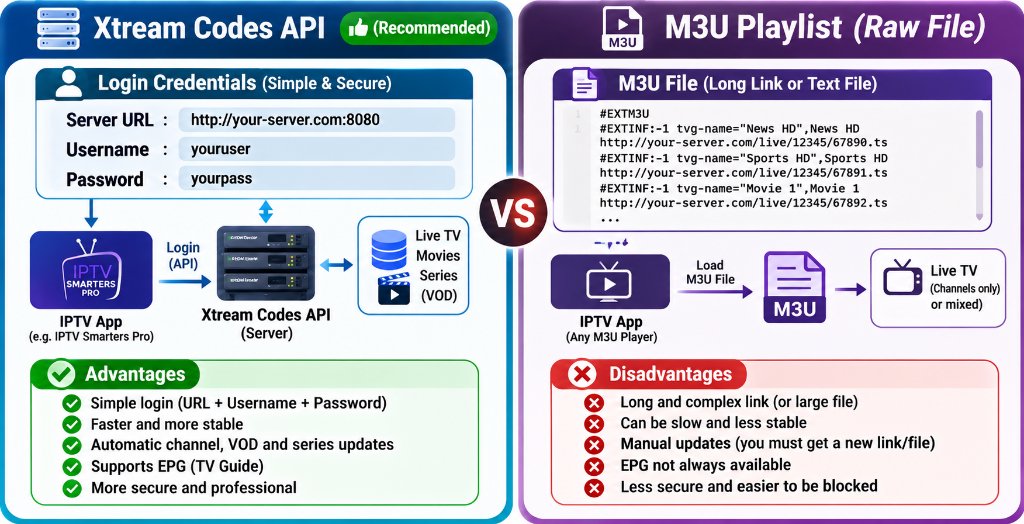
| Feature | Xtream Codes API (Recommended) | M3U Playlist File / URL |
|---|---|---|
| Login Simplicity | Clean: Name, Username, Password, URL | Cumbersome: Long 100+ character link |
| Authorization Stability | High (Direct handshake with auth token) | Moderate (Prone to copy-paste truncation) |
| EPG Auto-Sync | Fully automated program guide integration | Requires manual secondary XMLTV URL |
| VOD Categorization | Automatically categorizes movies and series | Often displays flat, unorganized lists |
| Error Recovery | Immediate token refresh on renewal | Requires reloading entire multi-megabyte list |
For an in-depth breakdown of server communication differences, read our complete technical comparison on Xtream Codes API vs M3U playlists.
Alternative Players: When to Try TiviMate
If IPTV Smarters continues reporting authorization glitches on your specific streaming hardware, testing your credentials in an alternative premium IPTV player like TiviMate IPTV Player is the fastest diagnostic test:
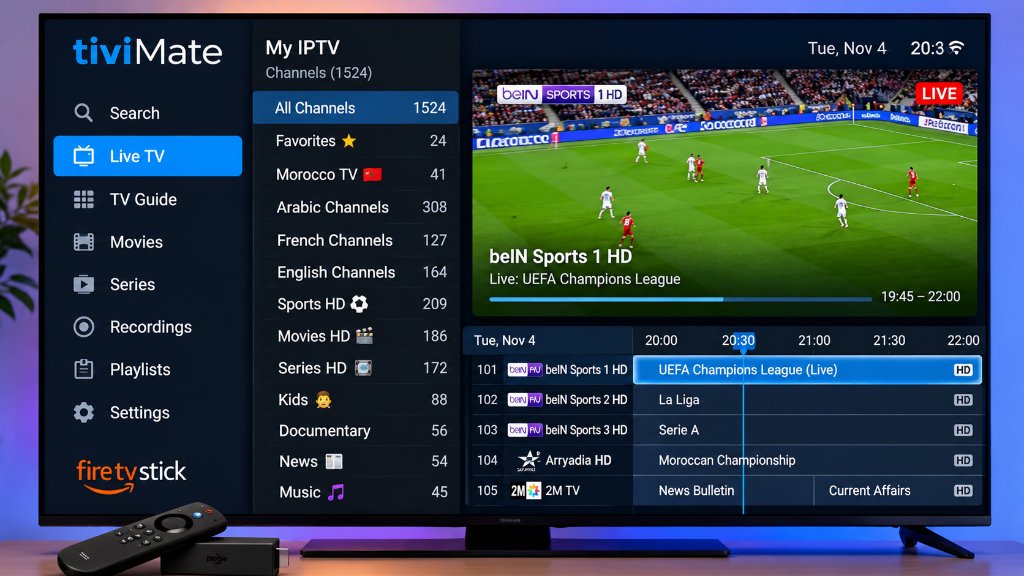
TiviMate features a more robust networking engine that automatically handles HTTP redirects and provides clearer diagnostic error messages (such as distinguishing between a 401 Unauthorized password error and a 404 Host Not Found network error).
Follow our step-by-step screenshots in the TiviMate FireStick setup master guide to configure your playlist in under three minutes.
Step-by-Step Setup: Adding Verified Credentials in Under 2 Minutes
Follow this verified checklist to configure your login with zero authorization errors:
http://[server-address]:[port] (verify no trailing / slash).Frequently Asked Questions
Q: Why does IPTV Smarters say invalid details when my password is correct?
In over 90% of cases, the error stems from an invisible space appended to the end of your username or password during copy-pasting, an incorrect server port number (such as omitting :8080), or an accidental trailing slash (/) at the end of the Server URL. Verify that your subscription status is currently active with your provider.
Q: Can I fix authorization errors by reinstalling IPTV Smarters?
Reinstalling the application clears corrupt local cache files and stale SQLite databases that cause login loops. However, if the underlying issue is an expired subscription, an ISP DNS block, or incorrect server URL syntax, reinstalling will not resolve the error until the root credentials or network settings are corrected.
Q: What is the difference between IP TV and traditional cable?
IP TV (Internet Protocol Television) transmits television broadcasts and on-demand video over standard internet protocol networks using packetized data streams rather than dedicated coaxial cables or satellite dishes. This architecture allows viewers to access live channels across any connected device (Smart TV, phone, tablet, PC) without proprietary cable set-top box rental fees.
Q: Why do public IPTV playlists buffer and die so quickly?
Public IPTV playlists shared on GitHub repositories or free streaming forums are monitored by hosting providers and copyright enforcement crawlers who revoke leaked tokens within hours. Furthermore, tens of thousands of users attempt to connect to the same stream simultaneously, saturating bandwidth and triggering immediate server authorization rejections.
Related Guides & Next Steps
Continue optimizing your home streaming system with our related technical tutorials:
- 📺 IPTV Smarters Pro FireStick Setup (2026 Master Guide): Complete installation instructions using Downloader codes.
- ⚡ Fix IPTV Buffering & ISP Throttling: Bypass Comcast, Spectrum, and AT&T streaming limits.
- 🔗 Xtream Codes API vs M3U Playlists: Understand why Xtream Codes API delivers faster zapping and automatic EPG updates.
- 📱 How to Setup TiviMate on FireStick: Explore the premier alternative player for multi-screen sports streaming.
Conclusion: Say Goodbye to Failed Authorization Errors
The IPTV Smarters failed to authorize error is almost always solvable through disciplined URL syntax verification, clearing device cache, or updating your DNS servers away from restrictive ISP resolvers.
However, if your errors stem from unreliable public playlists or overloaded budget servers that shut down during peak Sunday football games, switching to a high-throughput, private cloud provider like XIPTV PRO eliminates authentication headaches permanently.
Get Guaranteed 2-Minute Activation & Zero Login Errors
Enjoy 25,000+ live 4K channels, dedicated anti-freeze CDN edge routing, and round-the-clock WhatsApp support with our risk-free 7-day money-back guarantee:
Instant Xtream Codes Delivery • Works Flawlessly on IPTV Smarters & TiviMate