
Table of Contents
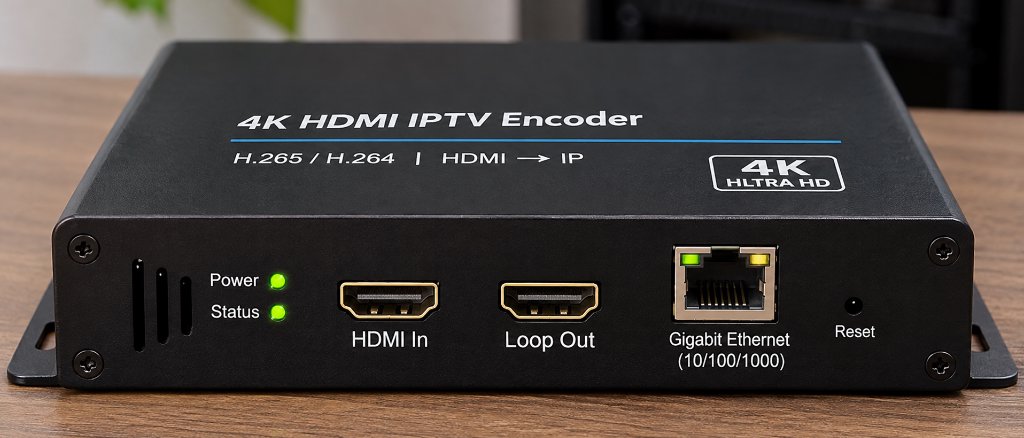
An HDMI encoder for IPTV is a specialized hardware device that captures uncompressed high-definition or 4K video from any HDMI source – such as cable set-top boxes, video cameras, gaming consoles, or media servers – compresses the signal in real time using advanced codecs like H.264 or H.265 (HEVC), and converts it into standard IP streaming protocols (such as RTSP, RTMP, HTTP Live Streaming, or UDP Multicast) for transmission across local networks or the internet.
In commercial environments like sports bars, college campuses, fitness centers, corporate offices, and hospitality venues, the hdmi encoder iptv setup has become the industry standard for distributing video to dozens of screens without running bulky, expensive HDMI matrix cables.
However, understanding the mechanics of hdmi iptv hardware, configuring protocols like RTSP, RTMP, and SRT, and calculating network bandwidth can quickly overwhelm newcomers. Moreover, many home users mistakenly purchase costly broadcast encoders when a managed cloud IPTV solution provides tens of thousands of pre-configured live streams for a fraction of the cost.
This comprehensive guide breaks down the core architecture of the hdmi encoder iptv ecosystem, compares hardware configurations against cloud-hosted alternatives like XIPTV PRO, and provides step-by-step installation instructions for your network.
Quick Comparison: Standalone Hardware Encoder vs Managed Cloud IPTV Service
Before investing hundreds of dollars into dedicated video hardware, consider how on-premise encoding contrasts with a managed cloud IPTV subscription:
| Evaluation Factor | Standalone HDMI IPTV Encoder | Managed Cloud IPTV Service (XIPTV PRO) |
|---|---|---|
| Primary Purpose | Distribute a single private HDMI source over IP | Stream 25,000+ live global TV channels & VOD |
| Initial Hardware Cost | $180 – $600 per channel | $0.00 (Runs on existing FireStick/Smart TV) |
| Channel Capacity | 1 channel per physical HDMI input port | 25,000+ live channels included out-of-the-box |
| Maintenance & Setup | Complex (Requires router, IP static mapping) | Simple (Instant 2-minute activation code) |
| Video Resolution | 1080p to 4K 60fps (depending on model) | 4K UHD, Full HD, and HD streams included |
| Best Suited For | Bars, gyms, studios, private venue broadcasts | Home cord-cutters, sports fans, movie binging |
| Ongoing Operating Cost | Electricity and hardware depreciation | $5.83 / mo (with 1-Year Premium Pass) |
For venues broadcasting local camera feeds or proprietary video signage, an on-premise encoder is indispensable. However, for users seeking multi-channel entertainment, sports, and international television without managing hardware racks, exploring the 1-Year USA IPTV Premium Pass provides immediate access to 25,000+ live 4K streams at a fraction of hardware costs.
Technical Specifications: The Anatomy of an IPTV Encoder
To evaluate any commercial hdmi iptv encoder, review these fundamental hardware and protocol baselines:
HDMI 1.4 / HDMI 2.0 (Type-A) with local loop-through
H.265 / HEVC (High Efficiency) & H.264 / AVC (Baseline/Main/High)
80ms – 200ms (Low Latency Mode) | 1.5s – 4.0s (HLS / Buffer Mode)
32 Kbps to 32,000 Kbps (CBR / VBR selectable)
AAC, AAC+, AAC++, MP3, AC3 passthrough (Stereo / 5.1)
HTTP, HLS, RTSP, RTMP, RTMPS, UDP/RTP Multicast, ONVIF, SRT
1000M RJ45 Gigabit Ethernet port (Optional 802.3af PoE)
Embedded Web GUI (HTTP), Telnet, REST API, or Cloud CMS
How an HDMI to IPTV Encoder Actually Works
The transformation of raw uncompressed video into lightweight network packets occurs in four synchronous stages inside the device:
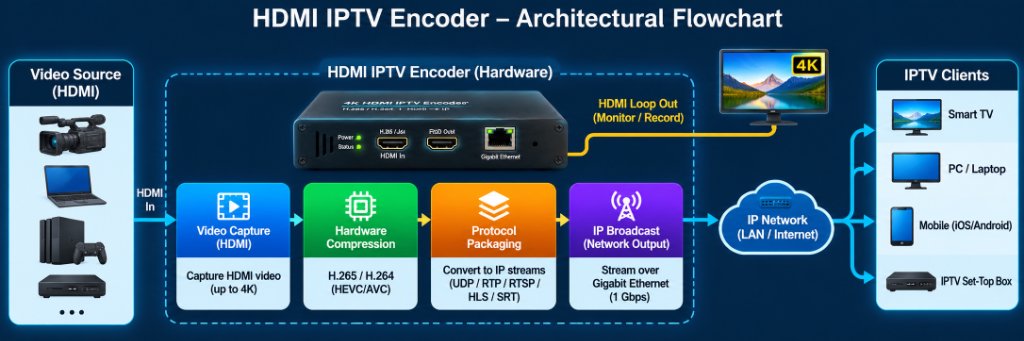
1. HDMI Video Capture and EDID Handshake
When you connect a video source (such as a cable receiver, video camera, or PC) to the encoder’s HDMI input port, the encoder performs an Extended Display Identification Data (EDID) handshake. This informs the source device of the supported resolutions (e.g., 3840×2160 @ 60Hz or 1920×1080 @ 60Hz) and audio formats.
2. Hardware Video Compression (H.264 vs H.265 HEVC)
Uncompressed 1080p video generates over 3 Gbps of raw data, and 4K at 60fps exceeds 12 Gbps – far beyond what standard Gigabit Ethernet networks can comfortably carry. The encoder features a dedicated hardware System-on-Chip (SoC) that compresses the video in real time:
- H.264 (AVC): The legacy standard. Compatible with virtually every screen, phone, and older smart TV. However, it requires higher bitrates (8-12 Mbps for 1080p60) to maintain crisp fidelity.
- H.265 (HEVC): The modern gold standard for any 4k iptv encoder. H.265 achieves approximately 40% to 50% better compression efficiency than H.264 at equivalent visual quality. This enables pristine 4K sports and movie streaming at manageable bitrates of 12 to 18 Mbps, cutting network congestion in half.
3. Protocol Packaging and Multiplexing
Once compressed, the video and audio packets are packaged into an IP transport container. Modern iptv encoders support multiple simultaneous streaming protocols:
- HTTP / HLS (HTTP Live Streaming): Slices the video into short `.ts` or fMP4 segments indexed by an `.m3u8` playlist. Ideal for Apple TV, Safari, and web browsers, though it introduces 3 to 10 seconds of playback latency.
- RTSP (Real-Time Streaming Protocol): The standard for local closed-circuit streaming and surveillance. Highly compatible with VLC Player and TiviMate, delivering sub-second glass-to-glass latency.
- RTMP / RTMPS: The workhorse protocol for broadcasting to live platforms like YouTube Live, Facebook, and Twitch.
- UDP / RTP Multicast: Transmits a single stream that multiple smart TVs or IPTV set-top boxes can tune into simultaneously without consuming additional switch bandwidth – critical for large venues.
- SRT (Secure Reliable Transport): A modern open-source protocol that combines low latency (under 200ms) with packet-recovery mechanisms to maintain rock-solid stability even over lossy internet connections.
4. IP Stream Distribution Across Your Local Network
The encoder assigns the stream to a local IP address and port (for example, rtsp://192.168.1.168:554/live/ch0). Any client device connected to the same LAN – whether a smart TV, an Amazon FireStick, an Apple TV, or a PC running VLC – can open that network URL and display the live broadcast with zero additional hardware.
Commercial and Real-World Applications for IPTV Encoders
Why do businesses and power users invest in dedicated iptv encoders? The technology solves several difficult physical distribution challenges:
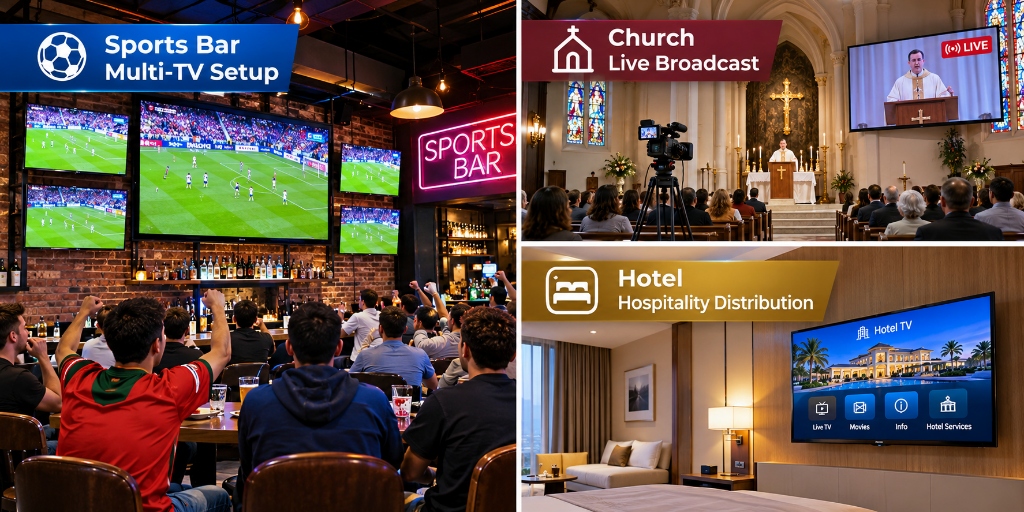
1. Sports Bars, Restaurants, and Fitness Centers
In a commercial sports bar with 30 television screens, running long HDMI cables from a central cable box to every TV requires expensive HDMI matrix switchers, signal repeaters, and thick conduit. High-definition HDMI signals degrade significantly over distances exceeding 50 feet without active optical cabling.
By installing a bank of multi-channel hdmi encoder for iptv units in the server room, the bar converts satellite or cable receiver feeds into multicast IP streams. The video travels over existing Cat6 network cables straight into smart TVs or cheap media players. Bartenders can switch channels on any TV instantly using a simple tablet or remote control interface.
2. Houses of Worship, Education, and Corporate Signage
Churches and college campuses use HDMI encoders to broadcast main sanctuary cameras or lecture hall podiums to overflow rooms, nursery screens, and foyer digital signage. The same encoder can simultaneously push an RTMP feed to online audiences via YouTube or Facebook Live while streaming low-latency RTSP feeds across the building’s internal Wi-Fi network.
3. Private Home Lab Restreaming
Enthusiasts frequently use a single hdmi to iptv encoder to capture a local cable box or gaming console and restream it into media center software like Plex, Emby, or Channels DVR. This allows homeowners to watch their primary living room cable feed on any bedroom TV, tablet, or phone throughout the house without renting additional set-top boxes.
Step-by-Step Configuration: How to Setup an HDMI IPTV Encoder
Setting up an encoder on your local area network involves five straightforward steps:
• Connect HDMI Source → Encoder HDMI IN
• Connect Ethernet Cable → Encoder RJ45 → Network Switch/Router
• Connect Power Adapter (12V DC) → Power LED turns Solid Green
• Default Encoder IP is typically
192.168.1.168 (check user manual)• Set your computer to the same subnet (e.g.,
192.168.1.100)• Open a web browser and enter
http://192.168.1.168• Login with default credentials (usually
admin / admin)
• Navigate to “Encoding Settings”
• Select Video Codec: H.265 (for 4K) or H.264 (for 1080p)
• Set Resolution: 3840×2160 (or match source)
• Set Frame Rate: 60 fps
• Select Bitrate Control: CBR (Constant Bitrate) at 12,000 Kbps
• Under “Stream Settings”, toggle ON your desired outputs:
– Enable RTSP: Port 554
– Enable HTTP / HLS: Port 8080 (produces
/live.m3u8)– Enable Multicast:
238.0.0.1:1234 (for multi-screen LAN broadcast)
• Open VLC Player or TiviMate on your FireStick
• Select “Open Network Stream”
• Paste your encoder URL:
rtsp://192.168.1.168:554/live/ch0• Verify smooth, low-latency video playback
The Big Picture: Hardware Encoders vs Cloud-Hosted IPTV Services
While owning a hardware iptv encoder provides total control over a local video feed, it has significant architectural limitations for general television entertainment:
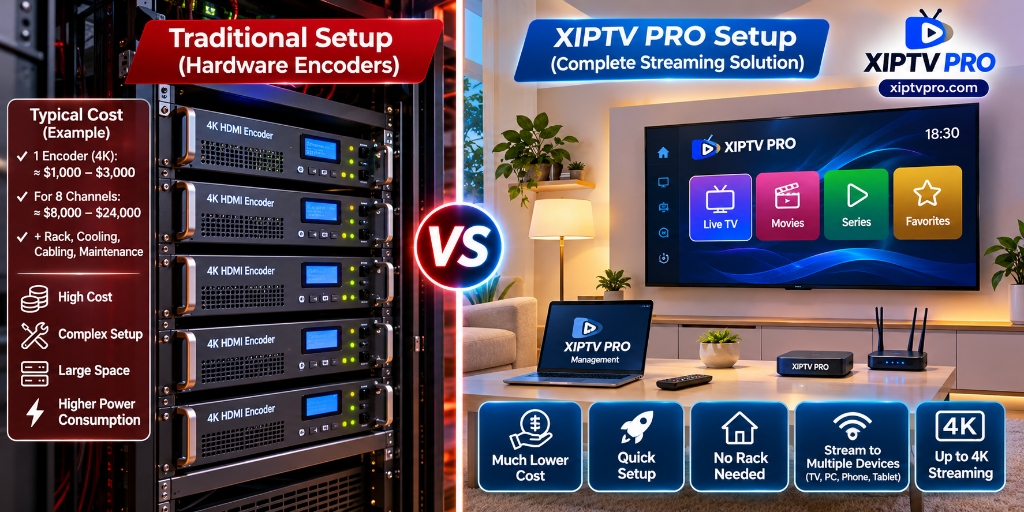
If you want to watch hundreds of out-of-market sports games, thousands of live news and entertainment channels, and extensive on-demand video libraries, physical encoders are mathematically impractical. Building an 8-channel headend requires eight physical cable boxes, eight 4K encoders ($2,000+), rack mounting, commercial cooling, and thousands of dollars in annual equipment subscriptions.
Modern managed providers like XIPTV PRO operate massive enterprise headends in secure cloud datacenters with redundant 10Gbps CDN uplinks. Instead of maintaining physical boxes in your living room or closet, you simply connect your FireStick, Smart TV, or phone to pre-optimized 4K 60fps streams with zero hardware investments.
For a detailed financial comparison of traditional cable equipment versus IPTV streaming, review our cable TV vs IPTV cost comparison guide and learn how to maintain flawless playback in our guide on watching sports without buffering.
Transparent Pricing: Accessing Enterprise 4K Streams for Pennies a Day
Instead of spending $300 or more on a single-channel encoder box, you can access over 25,000 live 4K and FHD channels, live sports passes, and 130,000+ movies through XIPTV PRO without contracts or hardware installations:
| Subscription Plan | Total Price | Effective Monthly Cost | Key Features Included | Direct Access |
|---|---|---|---|---|
| 1-Month USA IPTV Pass | $11.99 | $11.99 / mo | 25,000+ live 4K channels, 130K VOD, 24/7 support | View 1-Month Pass → |
| 3-Months USA IPTV Pass | $29.99 | $10.00 / mo | Full sports and entertainment package | View 3-Months Pass → |
| 6-Months USA IPTV Pass | $44.99 | $7.50 / mo | Regular season sports and movie library access | View 6-Months Pass → |
| 1-Year Premium Pass (Best Value) BEST VALUE | **$69.99** | **$5.83 / mo** | Maximum annual savings, instant setup, 7-day guarantee | Order 1-Year Pass → |
| 2-Years Ultimate Pass | $119.99 | $5.00 / mo | Lowest monthly rate for long-term cord-cutters | View 2-Years Pass → |
Every pass connects seamlessly to standard media players including TiviMate, IPTV Smarters Pro, and VLC. Review all plan tiers on the XIPTV PRO Shop.
Frequently Asked Questions
Q: What internet upload speed do I need for an HDMI IPTV encoder?
If you stream across your internal local network (LAN), your internet upload speed is irrelevant because traffic stays inside your Gigabit switch. However, if you plan to broadcast an encoder feed across the public internet (for remote viewing or YouTube Live), you need a reliable upload speed of at least 15 to 20 Mbps per 4K H.265 stream, or 8 to 10 Mbps for 1080p H.264.
Q: Can an HDMI IPTV encoder bypass HDCP copy protection?
Standard commercial HDMI encoders comply with international digital copy protection standards (HDCP). When connected to a protected HDCP 2.2 output (such as certain commercial set-top boxes or Blu-ray players), the encoder will output a black screen or an HDCP error banner. Professional broadcast installations resolve this by deploying active HDMI splitters or distribution amplifiers with EDID management.
Q: What is the difference between an IPTV encoder and an IPTV set-top box?
An IPTV encoder is an input/transmitting device: it takes a video feed (HDMI) and packages it into an IP network stream. An IPTV set-top box (such as an Amazon Fire TV Stick, Apple TV, or MAG box) is an output/receiving device: it connects to the network, decodes an IP stream, and displays it on your television screen.
Q: Why does HLS protocol introduce a delay on IPTV streams?
HLS chunks continuous live video into small file segments (usually 2 to 6 seconds each) and requires the player to buffer at least two or three segments before beginning playback. This architecture ensures smooth playback over fluctuating internet connections but inherently introduces 6 to 15 seconds of latency compared to real-time protocols like RTSP or UDP multicast.
Related Guides & Technical Resources
Deepen your video streaming knowledge with our companion guides:
- ⭐ Best IPTV Service in USA (2026 In-Depth Review): Complete evaluation of server uptime, CDN speeds, and 4K channel stability.
- ⚡ How to Watch Sports Without Buffering: Advanced router tuning, buffer cache configuration, and anti-ISP throttling techniques.
- 💰 Cable TV vs IPTV Cost Comparison: Mathematical breakdown showing how cord-cutters eliminate equipment fees and save $1,200 annually.
Conclusion: Mastering the IPTV Video Pipeline
The hdmi encoder for iptv represents a powerful bridge between physical video signals and modern digital IP networks. Whether you are distributing closed-circuit security feeds across an enterprise building, routing live game feeds to 30 screens in a sports bar, or building a high-end home streaming lab, choosing the right H.265 hardware and low-latency protocol (SRT or RTSP) ensures crystal-clear video delivery.
Yet for home entertainment, sports enthusiasts, and movie lovers, building your own hardware headend is costly and complex. With XIPTV PRO, you gain instant access to an enterprise-grade cloud streaming backend – delivering 25,000+ live 4K channels and all major sports passes straight to your living room for just $5.83 per month.
Ready to Experience High-Speed 4K Streaming?
Skip the expensive hardware racks and enjoy over 25,000 live channels and 130,000+ on-demand titles with our risk-free 7-day money-back guarantee:
Instant Activation via Email • Xtream Codes API & M3U • 24/7 Human Support